
Select the *ZIP module by entering option number 8 into the corresponding choice box. In the dialog program "Change i-effect Module Data", parameters can now be modified.
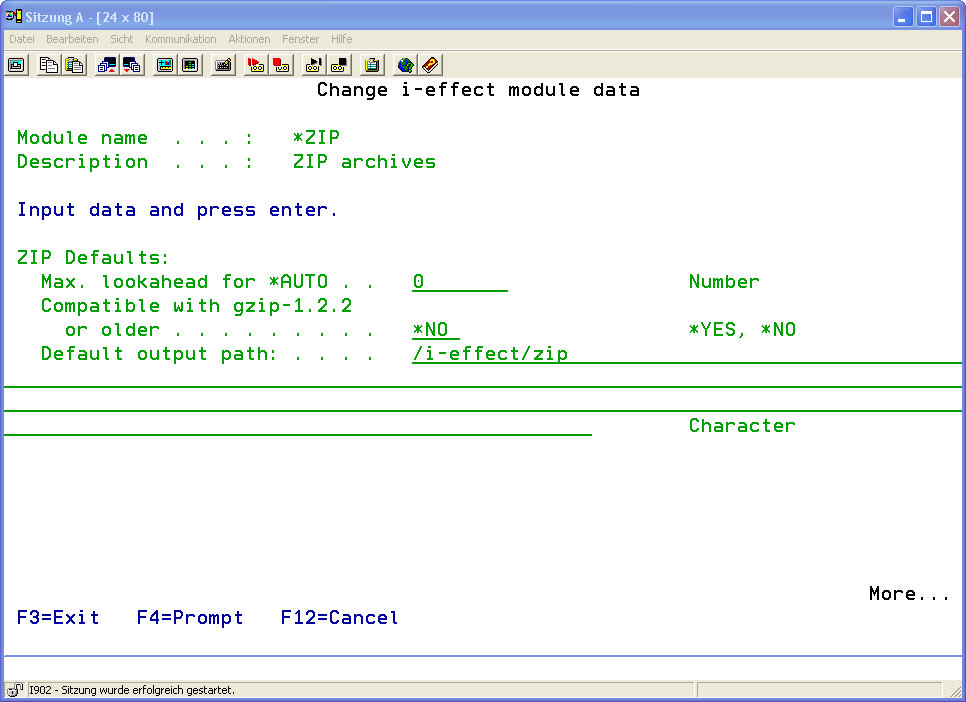
The following parameters can be defined for the *ZIP module:
|
*ZIP Defaults: |
||||||||||
|
Max. Lookahead for *AUTO |
The maximum lookahead defines how many bytes are to be read from the decompressed data stream when determining the record length of a file (OUTRECL(*AUTO)). The larger the number of bytes, the longer it takes to automatically determine the record length.
Default value: |
|
||||||||
|
Compatible with gzip 1.2.2 |
Determine if gzip files are generated in a format compatible with older versions of gzip. Version 1.2.2 does not support file comment fields, which are suppoted by version 1.2.4. and higher.
Possible values: |
|
||||||||
|
Default Output Path |
This parameter defines the path where files generated with this module will be stored this path automatically if the variable %DEFAULTPATH% is used in the OUTPFILE parameter of the CVTSPLXXX command. |
|
||||||||
|
ZIP Standards for Compression before Sending: |
||||||||||
|
Create ZIP Archive? |
Determine if a ZIP archive will be created to archive outbound data.
Possible values: |
|
||||||||
|
Compression Rate |
With this parameter the relation between optimal compression speed and maximum compression is managed. This relation is balanced in the default setting. Using value 1, the program achieves the highest speed but maximum compression will not be achieved. Using value 9, maximum compression is achieved but the program runs at a slower rate.
Default value: |
|
||||||||
|
Use Original Name? |
The original name of the input file can be output into the compressed output file. Therefore, i-effect® uses the name of the input file member. This name can be used for decompression in order to restore the file with exactly this name. (In this version the name can indeed be used for compression, but when decompressing the name is merely stored for information purposes in the file member text of the generated file member.)
Possible values: |
|
||||||||
|
Enter CRLF ? |
In order to enable the recipient to recognize the record structure of the original file, control characters for carriage return and line feed (CRLF) can optionally be inserted at the end of each record.
Possible values: |
|
||||||||
|
Delete Subsequent Blanks ? |
When processing a file for compression, i-effect® may delete all subsequent blanks at the end of each dataset. In connection with the parameter CRLFINSERT, this may be used to have the last character of a dataset followed by a record control character, which is not a blank.
Possible values: |
|
||||||||
|
From CCSID ? |
The code page number of the source system.
Possible values: |
|
||||||||
|
To CCSID ? |
The code page number of the target system. |
|
||||||||
|
Naming the Archive Entry |
Enter the name of the archive entry. |
|
||||||||
|
Format for Filenames |
Enter the default format for filenames. When storing the file in the archive, the file is built as follows. |
|
||||||||
|
ZIP Standards for Decompression after Reception: |
||||||
|
From CCSID ? |
The code page number of the source system. |
|
||||
|
To CCSID ? |
The code page number of the target system. |
|
||||
|
Record Length Output File |
This parameter defines the record length of the output file. |
|
||||
|
Output Library |
Enter the name of the library for output files. |
|
||||