
Select the *TELEBOX module by entering option number 8 into the corresponding choice box. In the dialog program „Change i-effect Module Data", parameters can now be modified.
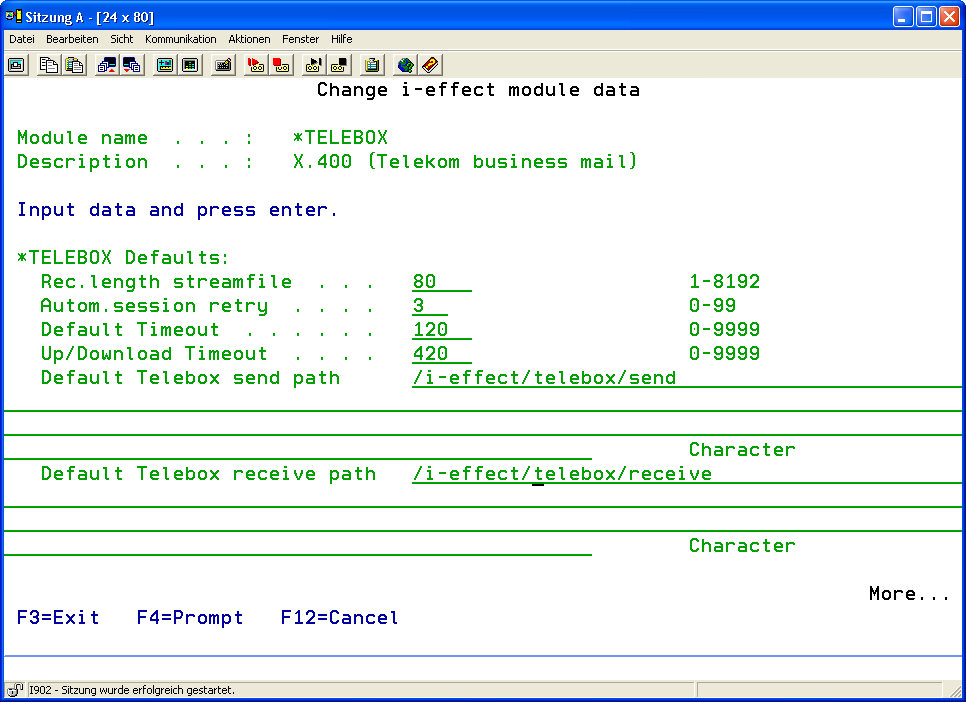
The following options for the *TELEBOX module can be set:
|
*TELEBOX Details: |
||
|
Record Length Stream File |
Enter the record length of a dataset in data stream data. |
|
|
Number |
Valid values: 1-8192 |
|
|
Retries |
Define the maximum number of attempts to establish *TELEBOX communication. |
|
|
Number |
Valid values: 0-99 |
|
|
Default Timeout |
Define a timeout value until *TELEBOX communication is canceled in the case of error. |
|
|
Number |
Valid values: 0-9999 |
|
|
Up/Download Timeout |
Define a timeout value until *TELEBOX communication is canceled in the case of upload or download failure. |
|
|
Number |
Valid values: 0-9999 |
|
|
Default Telebox Send Path |
Enter the default path from where *TELEBOX data is sent. Default path: /i-effect//telebox/send |
|
|
Default Telebox Receive Path |
Enter the default path where *TELEBOX data is received. Default path: /i-effect//telebox/receive |
|
|
*TELEBOX Archive Settings: |
||
|
Archive Inbound Messages ? |
Determine if inbound *TELEBOX messages will be archived. |
|
|
*YES |
YES, *TELEBOX inbound messages will be archived. |
|
|
*NO |
NO, *TELEBOX inbound messages will not be archived. |
|
|
Archive Path (Inbound) |
Enter the path where inbound *TELEBOX data will be archived. Default path: /i-effect//archive/telebox/receive |
|
|
Archive Outbound Messages ? |
Determine if outbound *TELEBOX messages shall be archived |
|
|
*YES |
YES, *TELEBOX outbound messages will be archived. |
|
|
*NO |
NO, *TELEBOX outbound messages will not be archived. |
|
|
Archive Path (Outbound) |
Enter the path where outbound TELEBOX data will be archived. Default path: /i-effect//archive/telebox/send |
|
|
*TELEBOX Error: |
||
|
Path for Erroneous Files |
This parameter determines the name of the path where erroneous *TELEBOX data is moved. Default path: /i-effect//archive/telebox/error |
|