
Select the *BASE module by entering option number 8 into the corresponding choice box. In the dialog program "Change i-effect Module Data", parameters can now be modified.
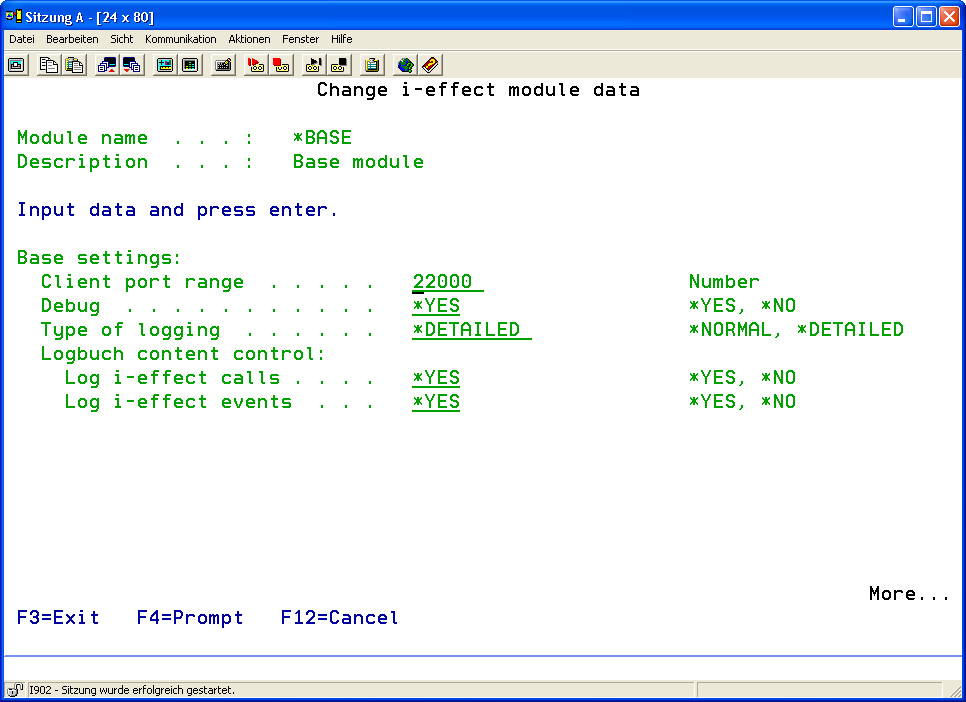
The following options for the *BASE module can be set:
|
Client Port Range |
Enter the port range for clients that have remote access to certain functionalities of i-effect®. |
|
|
Positive Integral |
Default Value: 22000 |
|
|
Debug ? |
The debug switch controls whether additional information is recorded in the job log within an i-effect® application and whether temporary files are kept for analysis.
Possible values: |
|
|
*NO |
Additional information is not recorded. Temporary files will be deleted at the end of the job. |
|
|
*YES |
Additional information is recorded. Temporary files will not be deleted at the end of the job. |
|
|
Type of Logging |
This parameter determines the amount of messages logged into the job log. It is recommended to set this parameter to *DETAILED in order to allow a detailed problem analysis. Important information for the support will be recorded.
Possible values: |
|
|
*NORMAL |
Normal logging. |
|
|
*DETAILED |
Detailed logging. |
|
|
Logbook Control |
This parameter includes two elements:
|
|
This parameter is used to define the amount of messages logged into the logbook. Using the value *NO in both parameters completely disables all logging.
|
Internal Protocols: Other Work Files |
This directory is fixed during installation and cannot be changed. It contains internal loggings and debugging information. |
Default: /i-effect//internal
|
Basic IFS |
This directory is fixed during installation and cannot be changed. It contains the basic i-effect® program directory in the IFS files system. |
Default: /i-effect/
|
Sending Preparation Path: Working Directory |
This directory contains files prepared for sending. It is a working directory for i-effect® that can store temporary work files. |
Default: /i-effect//internal/send_prepared