
Select the *SERVER module by entering option number 8 into the corresponding choice box. In the dialog program "Change i-effect Module Data", parameters can now be modified.
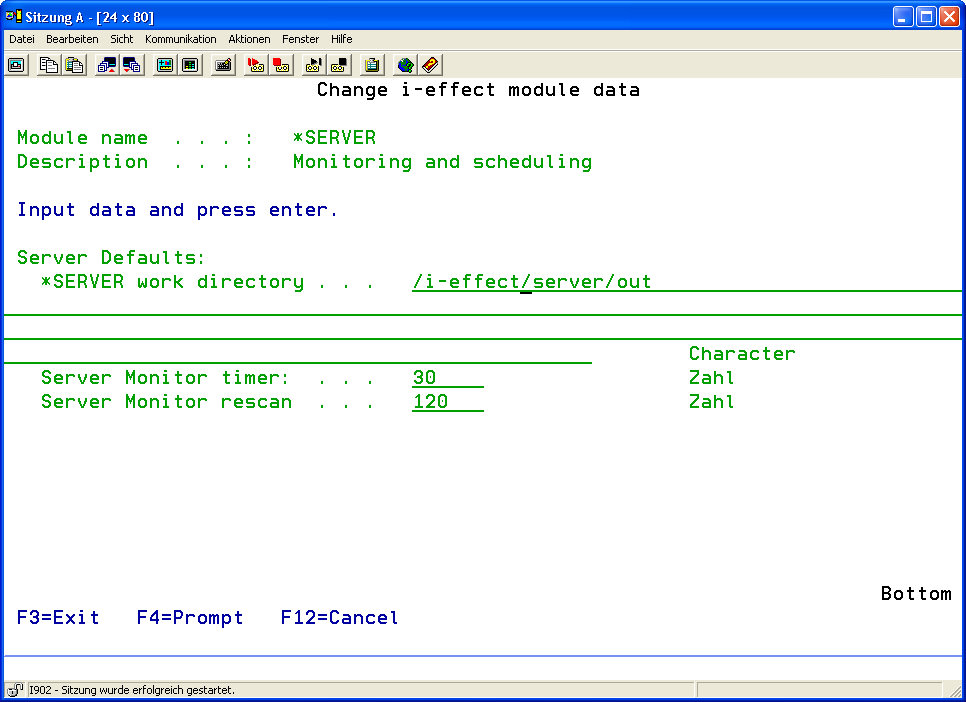
The following options for the *SERVER module can be set:
|
SERVER Defaults: |
||
|---|---|---|
|
*SERVER Working Directory |
This directory temporarily stores files that were generated in a server process and serve as source files for further server processes. |
|
|
|
||
|
Server Monitor Timer |
Time between scans of IFS directories and DB2 libraries, both monitored by *MONITOR of the i-effect® *SERVER module. |
|
|
Server Monitor Rescan |
Time passing until the same file is called again for processing when scanning IFS directories and DB2 libraries, both monitored by *MONITOR of the i-effect® *SERVER module. |
|
|
Backup Monitor Processing List |
It can be specified here, if a list of files/file names currently being monitored will be backed up when EFFSERVER subsystems are shut down. This list will be used during the next start up to restore the file/processing list for every monitor. Double or multiple processing due to system restart can be avoided with this option. |
|
|
*YES |
Processing/ File lists will be backed up at shutdown. |
|
|
*NO |
Processing/ File lists will not be backed up at shutdown. |
|
The file is reprocessed untill it is either replaced or deleted from the monitored library/directory. This parameter only specifies the duration of the interval during which processed files existing in the library/directory are not processed.