
Select the *FAX module by entering option number 8 into the corresponding choice box. In the dialog program "Change i-effect Module Data", parameters can now be modified.
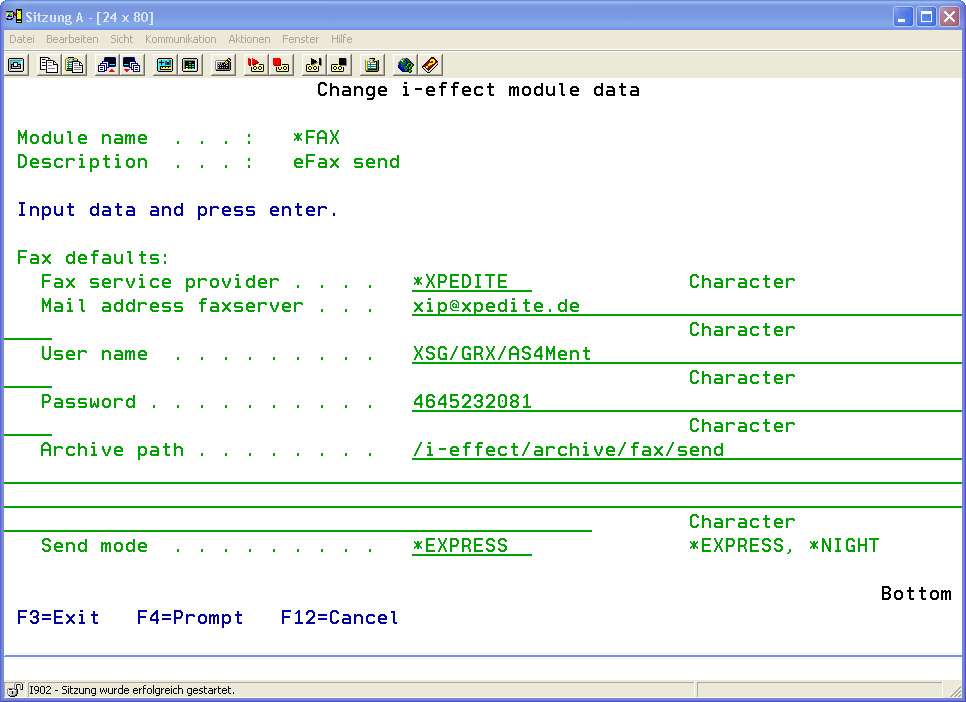
The following options for the *FAX module can be set:
|
Fax Parameters |
|
|
Fax Service Provider |
Enter the fax service provider's name. The fax is sent via telephone lines to the designated addressees. |
|
Email Address Fax Server |
Enter the email address of the fax server that is used to receive the fax jobs in the form of an email.
http://datacomm.premiereglobal.com/de/de/ |
|
User ID |
Enter a user ID to login to the fax-email-server. |
|
Password |
Enter a password to login to the fax-email-server. |
|
Archive Path |
Define the directory where outbound faxes are to be stored. |
Default path: /i-effect/<RELEASE>/archive/fax/send
|
Send Mode |
This parameter determines the mode of sending. The fax can either be sent immediately to the recipient or the cost-effective night rate is used.
The following values are possible: |
|
|
*NIGHT |
||
|
*EXPRESS |
Using this mode, the fax is sent immediately after transmission to the fax server. It is sent with high priority at a higher rate. |
|