
You can start all or individual subsystems of i-effect with the following dialog program. This will no longer be necessary after version V1R3M1, because the required sub systems will be started automatically.
Select menu item 85 in the i-effect main menu to start sub systems.
The following display will appear:
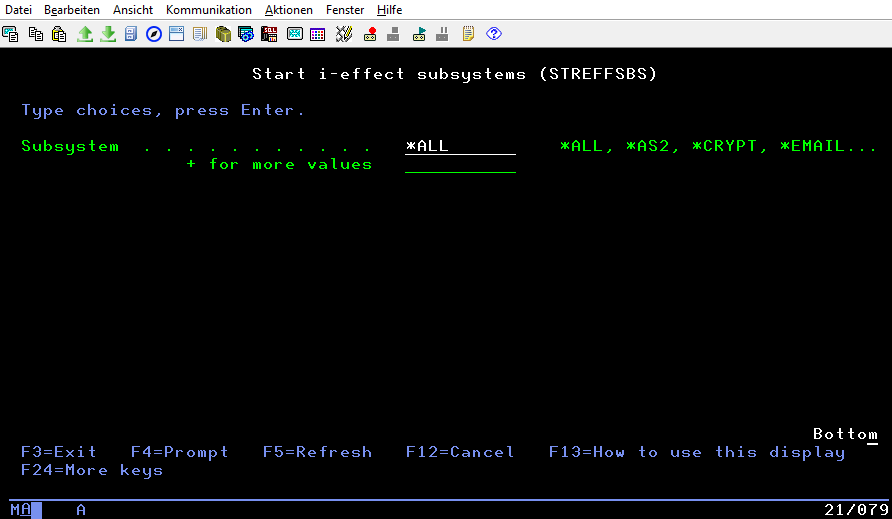
The following values - depending on the modules be licensed - are possible:
|
Subsystem |
Description |
|---|---|
|
*ALL |
All i-effect subsystems are started. |
|
*AS2 |
The i-effect AS2 subsystem is started. |
|
*CRYPT |
The i-effect CRYPT subsystem is started. |
|
|
The i-effect EMAIL subsystem is started. |
|
*REPORT |
The i-effect REPORT subsystem is started. |
|
*SOA |
The i-effect SOA subsystem is started. |
|
*ZIP |
The i-effect ZIP subsystem is started. |
|
*SERVER |
The i-effect SERVER subsystem is started. |
|
*OFTP2 |
The i-effect OFTP2 subsystem is started. |
|
*HTTP |
The i-effect HTTP subsystem is started. |
|
*OCSP |
The i-effect OCSP subsystem is started. |
|
*EDI |
The i-effect EDI subsystem is started. |
|
*FTP |
The i-effect FTP subsystem is started. |
|
*UTIL |
The i-effect UTIL subsystem is started. |
|
*ZUGFERD |
The i-effect ZUGFERD subsystem is started. |
|
*SERVICE |
The i-effect SERVICE subsystem is started. |
|
*WEBCTRL |
The i-effect WEBCONTROL subsystem is started. |