
Select the *EDIFACT module by entering option number 8 into the corresponding choice box. In the dialog program "Change i-effect Module Data", parameters can now be modified.
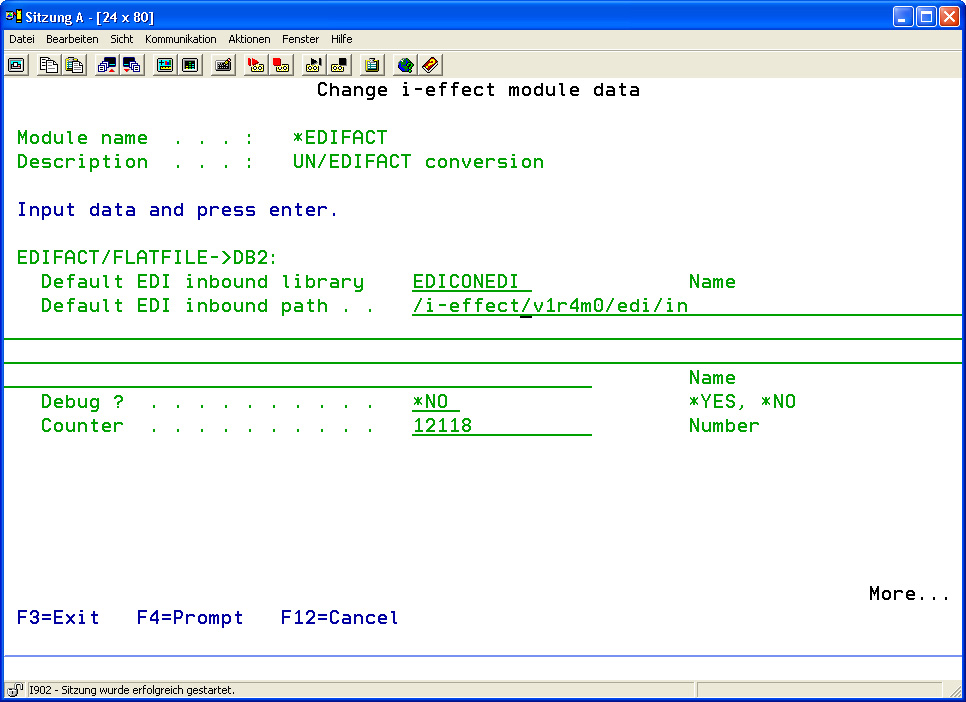
The following options for the *EDIFACT module can be set:
|
EDIFACT general settings: |
||
|
One File per Document ? |
This parameter determines if a new output file is generated for each record processed from a primary file. |
|
|
*YES |
A new output file is created for every primary data set. |
|
|
*NO |
A new output file is created only if the description of the primary file, defined as primary key, changes. |
|
|
EDIFACT/FLATFILE->DB2: |
||
|
Default EDI Inbound Library |
This parameter determines the name of the library being used as default inbound library to process conversions EDIFACT/FLATFILE->DB2. This default library will be provided automatically when selecting the form of conversion from the DB2 file system, when the conversion command is used. |
|
|
Name |
(Deutsch) Name of the Default EDI Inbound LibraryName of the Default EDI Inbound Library |
|
|
Default EDI Inbound Path |
This parameter determines the name of the path used as the default inbound path to process conversions EDIFACT/FLATFILE->DB2. This default path will be provided automatically when selecting the form of conversion from the IFS file system, when the conversion command is used. |
|
Default path: /i-effect//edi/in
|
Debug ? |
This parameter determines if conversion is to be processed with or without debugging. If this parameter is set to *YES, errors occurring during conversion do not lead to cancellation of the conversion process. All problems that occur during conversion are logged into the logbook for further analysis. |
|
|
*YES |
YES, conversion is processed with debugging. |
|
|
*NO |
NO, conversion is processed without debugging. |
|
|
Counter |
This global counter can be used in a conversion mapping table, e.g. to generate a clear serial counter number for every generated output file. |
|
|
Number |
Counter value |
|
|
DB2 -> EDIFACT/FLATFILE: |
||
|
Default EDI Outbound Library |
This parameter determines the name of the library being used as default outbound library to process conversions EDIFACT/FLATFILE->DB2. This default library will be provided automatically when selecting the form of conversion from the DB2 file system, when the conversion command is used. |
|
|
Name |
Name of the Default EDI Outbound Library |
|
|
Next Number |
In the DB2 file system, only 10-digit names can be used to store output files of a conversion. The name is generated automatically, composed of a prefix (1 character) and a serial number (9 digits) created here. This number will be automatically increased by 1 for every generated outbound file. |
|
|
Number |
Value of the next number. |
|
|
File Prefix |
In the DB2 file system, only 10-digit names can be used to store output files of a conversion. The name is generated automatically, composed of a prefix (1 character) to be defined here and serial number (9 digits) created in the parameter "Next Number". |
|
|
Character |
Value of the file prefix. |
|
|
Default EDI Outbound Path |
This parameter determines the name of the path being used as default outbound path to process conversions EDIFACT/FLATFILE->DB2. This default path will be provided automatically when selecting the form of conversion from the IFS file system, when the conversion command is used. |
|
Default path: /i-effect//edi/out
|
Debug ? |
This parameter determines if conversion is to be processed with or without debugging. If this parameter is set to *YES, errors occurring during conversion do not lead to cancellation of the conversion process. All problems that occur during conversion are logged into the logbook for further analysis. |
|
|
*YES |
YES, conversion is processed with debugging. |
|
|
*NO |
NO, conversion is processed without debugging. |
|
|
EDI Archiving: |
||
|
Archive Inbound Files ? |
This parameter determines if inbound files are to be stored in an archive directory after being processed. (A copy of the generated file will be made.) |
|
|
*YES |
YES, every processed inbound file is archived. |
|
|
*NO |
NO, none of the processed inbound files is archived. |
|
|
Default EDI Inbound Archive Path |
This parameter determines the name of the path where inbound files are to be archived if archiving is activated. Directories will be created automatically in this path if they do not exist.
|
|
|
Archive Outbound Files ? |
This parameter determines if outbound files are to be stored in an archive directory after being processed. (A copy of the generated file will be made.) |
|
|
*YES |
YES, every processed outbound file is archived. |
|
|
*NO |
NO, none of the processed outbound files is archived. |
|
|
Default EDI Outbound Archive Path |
This parameter determines the name of the path where outbound files are to be archived if archiving is activated. Directories will be created automatically in this path if they do not exist.
|
|
|
EDI Error: |
||
|
Path for Erroneous Files |
This parameter determines the name of the path where erroneous files are to be moved to, if desired.
|
|