
To reach the menu where an OTFP sending profile can be added, select menu item 52 in the i-effect main menu. Press F6 to call up the menu where a new communication profile can be added. Then, select OFTP communication using option number 1 in the corresponding choice box. In the following menu, please select *SEND.
The following parameters can be configured:
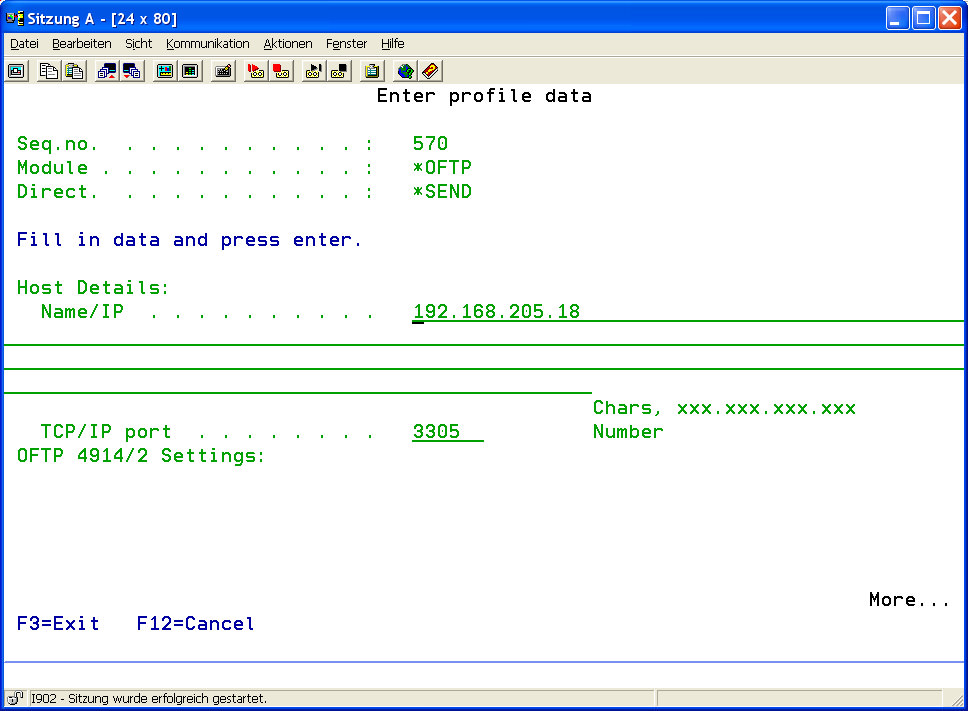
|
Host Details: |
|||||||||
|
Name/IP: |
Enter the IP number or the DNS hostname of the partner's server. |
||||||||
|
TCP/IP port: |
Enter the port number of the partner's server. The default port for the OFTP protocol is 3305, but it may differ. This parameter is to be re-quested from the partner.
|
||||||||
|
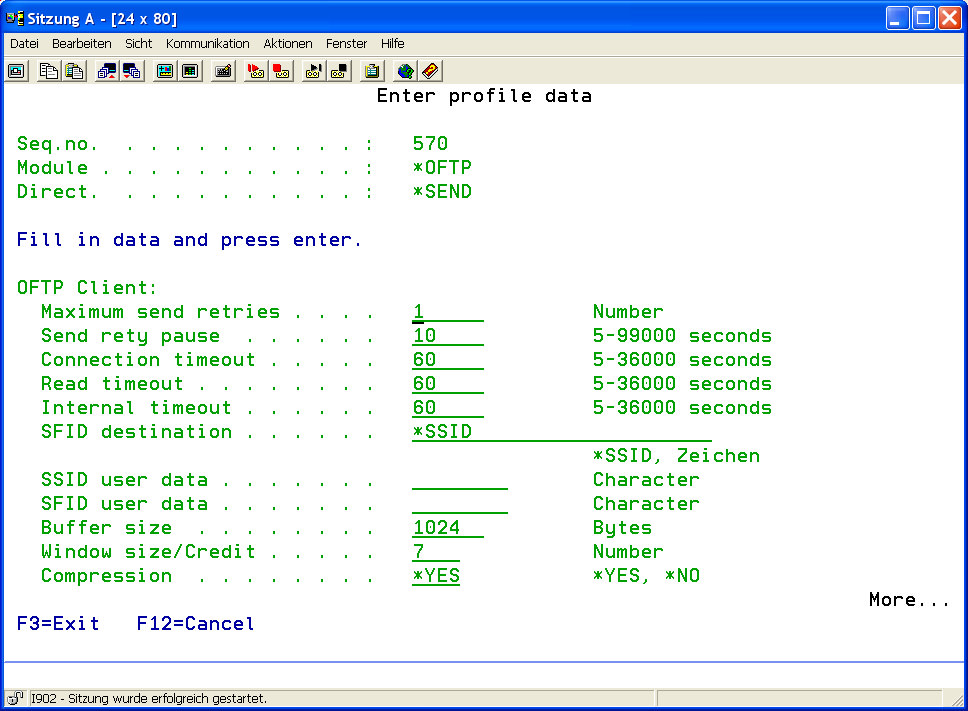
OFTP Client: |
|||||||||
|
Maximum Send Retries |
Determine the maximum number of attempts to retry to connect after connection failure. |
||||||||
|
Send Retry Pause |
Determine the pause in seconds before the next attempt to connect is started. |
||||||||
|
Connection Timeout |
Determine the timeout in seconds for connection establishment. |
||||||||
|
Read Timeout |
Determine the timeout in seconds for reading data on an open data connection. |
||||||||
|
Internal Timeout |
This parameter determines the OFTP client's internal connection timeout. The OFTP client waits the set time, for example in the case of processing bottlenecks, to try to process user defined tasks (prepare / send OFTP data) |
||||||||
|
SFID Destination Address |
Determine the recipient's Odette ID. Usually it is identical to the partner's Odette ID. It may differ if data is transmitted via an OFTP gateway. |
||||||||
|
SSID User Data |
Generally, this parameter is only required in the case of bilateral agreement between the partners. |
||||||||
|
SFID User Data |
Generally, this parameter is only required in the case of bilateral agreement between the partners. |
||||||||
|
Buffer Size |
Determine the maximum buffer size used in data transmission. A common value for TCP/IP connections is 2048 or 4096, for X.25 via ISDN connections it is 256 to 512. |
||||||||
|
Window Size / Credit |
This parameter determines the number of buffers that can be transmitted until the partner is requested to refill the credit. This parameter is comparable to the TCP common term "Window Size". A common value is 7.
|
||||||||
|
Compression |
This parameter determines if a simple compression for *TEXT files (see "Fix, Variable, Unstruct, Text") is to be used. This must be supported by the remote side. |
||||||||
|
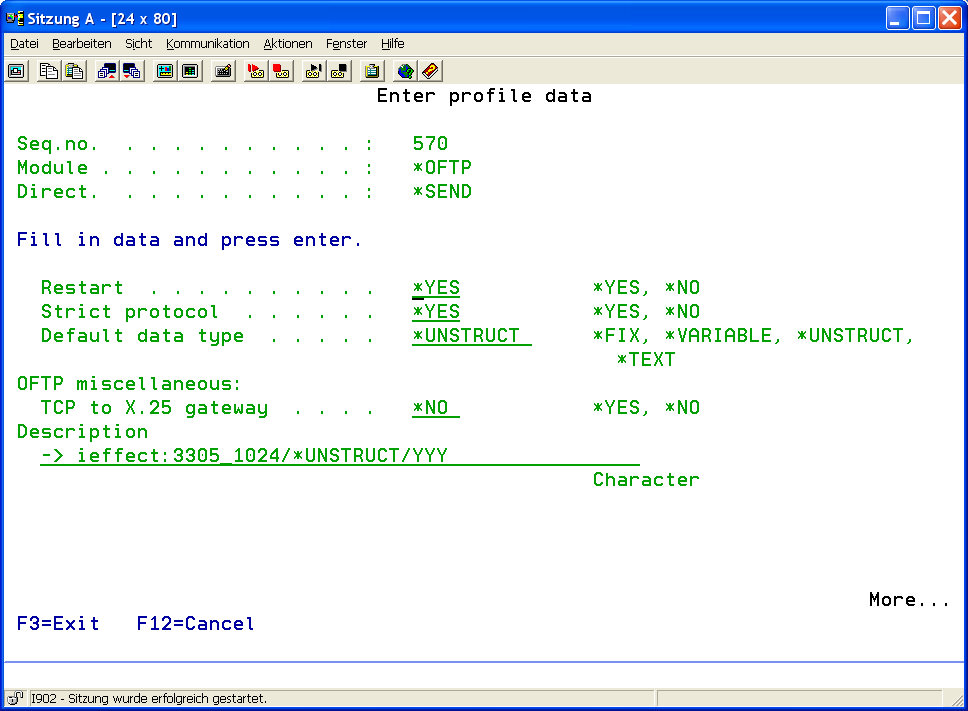
Restart |
If transmission was interrupted in a previous data transmission, this parameter determines if data transmission will be continued at the point of interruption. This must be supported by the remote side. |
||||||||
|
Strict Protocol |
This parameter determines if data transmission is done without de- viating from the standard protocol. Setting this parameter to *NO might be necessary if the partner uses an ODEX system, or if protocol errors occur regularly on the remote side. |
||||||||
|
Fix, Variable, Unstruct, Text |
In *OFTP data transmission, data can be sent/received in one of 4 different types of transmission: *FIX, *VARIABLE, *TEXT and *UNSTRUCT (explanation below):
|
||||||||
|
OFTP Other: |
|||||||||
|
TCP/IP to X.25 Gateway |
This parameter determines if the OFTP connection is to be established via a TCP/X.25 gateway, or a native TCP/IP connection is to be used. In the first case, a X.25 compatible router is connected with the local network via TCP/IP and forwards the OFTP transmission request to a native X.25 or ISDN network (X.25 via ISDN B-channel). Possible options:
|
||||||||
|
Description |
A brief description of the sending profile can be created here. Indicating the IP/hostname port combination or X.25 addresses that is used to connect with the partner, e.g. OFTP.MENTEN.DE:3305, is recommended. |
||||||||
After a partner entry has been created, authentication details for an entry can be stored by entering option number 12 into the corresponding choice box.