
To reach the menu where a FTP sending/reception profile (working in both directions) can be added, select menu item 52 in the i-effect main menu.
Press F6 to call up the menu where a new communication profile can be added. Then, select FTP communication using option number 1 in the corresponding choice box. In the following menu, please select *BOTH.
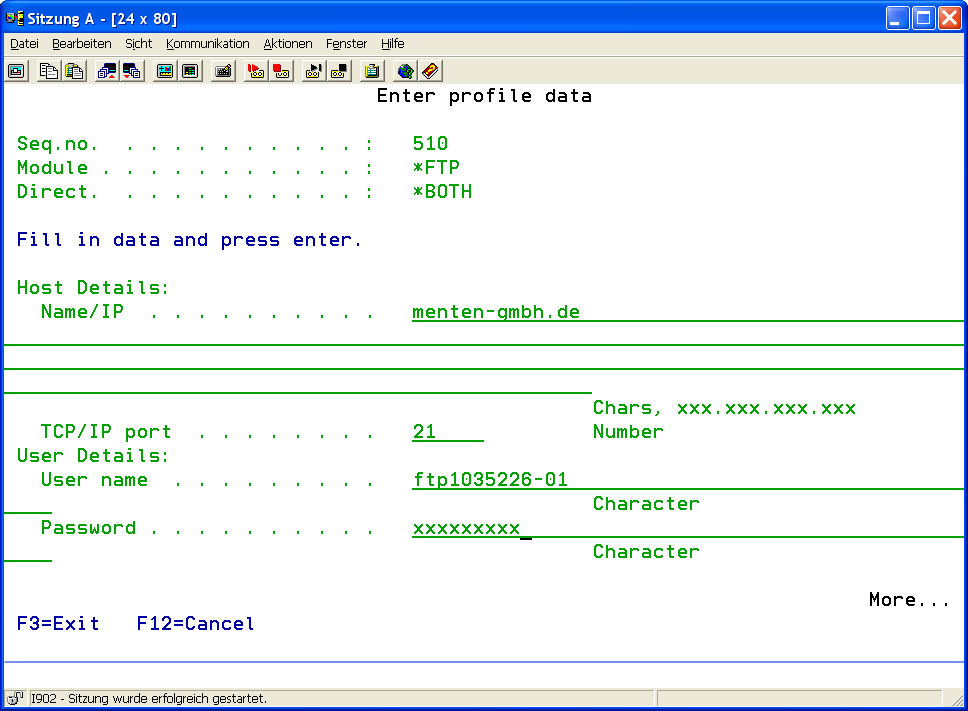
The following parameters can be configured:
|
Host Details: |
|||||||
|
Name/IP |
Enter the IP number or the DNS hostname of the partner's FTP server. |
||||||
|
TCP/IP port |
Enter the port number of the partner's FTP server. The default port for the FTP protocol is 21. |
||||||
|
User Details: |
|||||||
|
User ID |
Enter the user ID needed to login to the FTP server. |
||||||
|
Password |
Enter the password corresponding to the user ID. |
||||||
|
FTP Details: |
|||||||
|
Default Transmission Type |
This parameter determines the type of transmission commonly used with this FTP server. The default setting can be overwritten for every single transmission.
|
||||||
|
Default Mode |
Enter the default FTP mode that is to be used.
|
||||||
|
Description |
A short description of the FTP profile can be created here. This field has only a descriptive character, its content is arbitrary. |
||||||