
|
Use Existing Line |
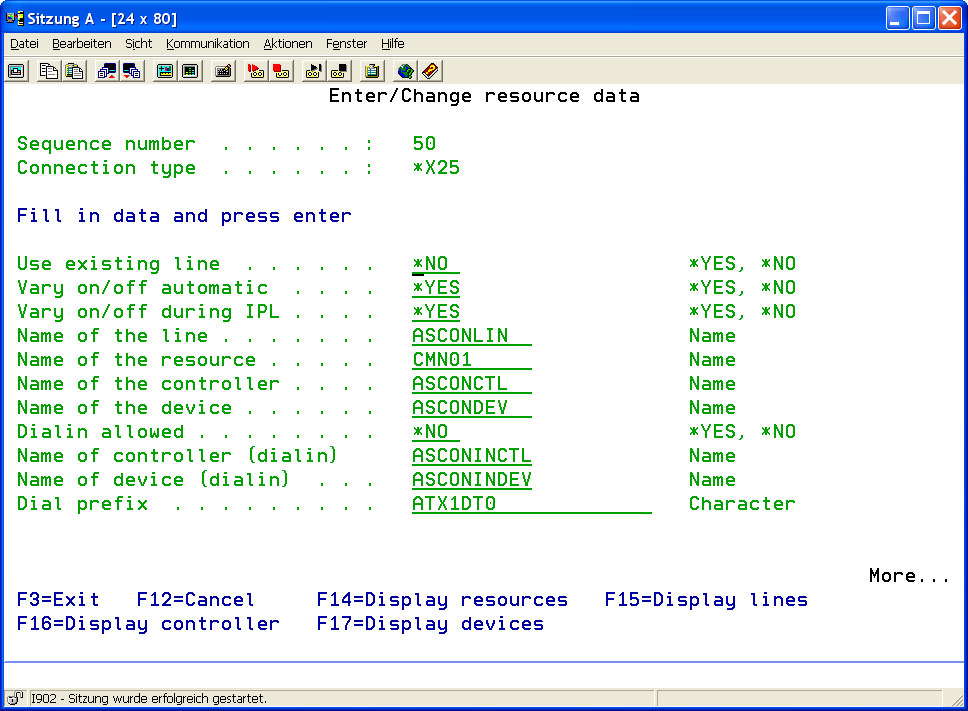
This parameter determines whether an existing line description on the system will be used or a new line description is to be created. Usually there will be an existing line if a Datex-P connection running several logical channels is in use. |
|
|
*YES |
Yes, an existing line is to be used. |
|
|
*NO |
No, a new line will be created. |
|
|
Line on / off |
This parameter determines if lines are to be varied on and off automatically. In this case, the line needs not to be activated by operating staff. |
|
|
*YES |
Yes, lines are varied on and off automatically |
|
|
*NO |
No, lines must be varied on and off by the system user |
|
|
Vary on and off during IPL |
Lines managed here can be varied on automatically after system reboot. This field's entry controls the IPL ( ) value in the line description |
|
|
*YES |
Yes, the line is to be varied on after system reboot. IPL(*YES). |
|
|
*NO |
No, lines are not varied on after system reboot. IPL(*NO). |
|
|
Line Name |
Enter a line description name that is to be used for the resource. |
|
|
Resource Name |
Enter the AS/400 resource name (CMN01/LIN011....). |
|
|
Controller Name |
Enter a controller description name that is to be used for the resource. |
|
|
Device Name |
Enter a device description name that is to be used for the resource. |
|
|
Dial-in allowed |
For certain communication modules (e.g. OFTP), the partner's dial-in to this AS/400 system can be allowed. This parameter determines if this is generally allowed for this resource. |
|
|
*YES |
Yes, dial-in for certain modules is allowed. |
|
|
*NO |
No, dial-in for this resource is not allowed. |
|
|
||
|
Controller Name (dial-in) |
Enter, if allowed, a controller description name which is to be used here. |
|
|
Device Name (dial-in) |
Enter, if allowed, a device description name that is to be used here. |
|
|
Connection Prefix |
This parameter defines additional numbers to be dialed before the connection number stored in the profile-resource-allocation. Using for example ATX1DT0 a "0" is prefixed to reach a subscriber line in a telephone system. |
|
|
Name of Physical Interface |
Enter the name of the interface to which the resource is connected.
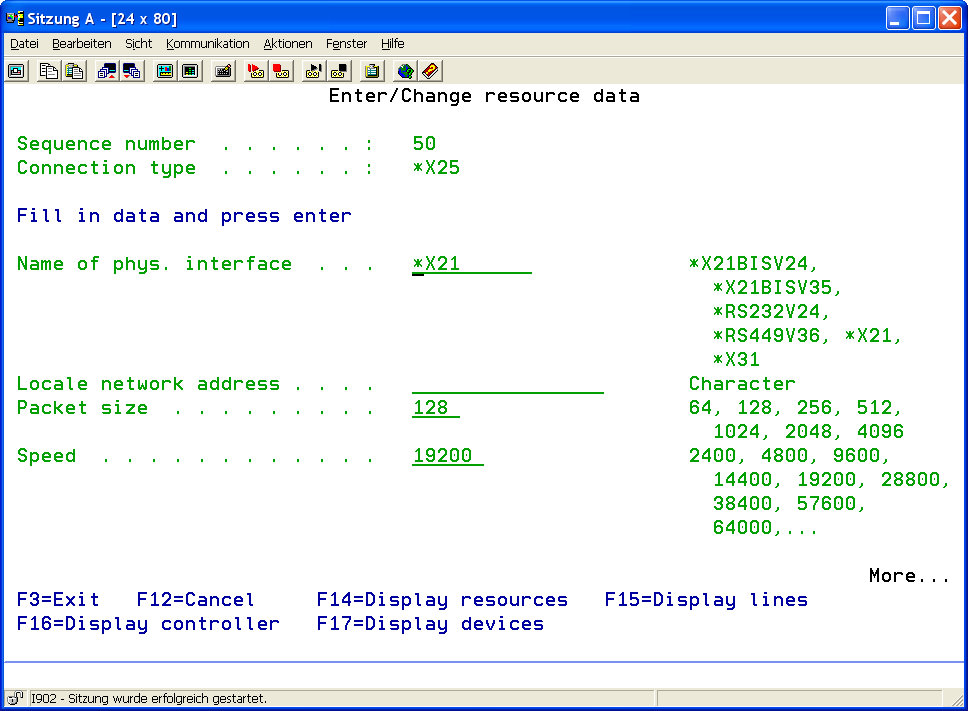
Possible values: *X21BISV24, *X21BISV35, *RS232V24, *RS449V36, *X21, *X31 |
|
|
Local Network Address |
Enter the address (connection number) allocated to the line. |
|
|
Packet Size |
Enter the packed size to be used.
Possible values: 64, 128, 256, 512, 1024, 2048, 4096 |
|
|
Speed |
This parameter determines the resource's line speed
Valid values are 2400,4800,9600,14400,19200,38400,57600,64000.... |
|
|
Description |
A short description of the resource entry. |
|