
Partner master data for outbound EDIFACT messages can be defined here.
|
Process |
|
|
*YES |
EDIFACT files are processed. |
|
*NO |
EDIFACT files are not processed. |
|
Syntax ID |
If a value is entered into this field, the field S001-0001 in the UNB segment will be filled with this value as soon as the function *SYNID is used when mapping. |
|
Syntax Version |
If a value is entered into this field, the field S001-0002 in the UNB segment will be filled with this value as soon as the function *SYNVER is used when mapping. |
|
Sender |
|
|
Sender ID |
If a value is entered into this field, the field S002-0004 in the UNB segment will be filled with this value as soon as the function *SNDID is used when mapping. |
|
Sender Qualifier |
If a value is entered into this field, the field S002-0007 in the UNB segment will be filled with this value as soon as the function *SNDQUAL is used when mapping. |
|
Sender Rerouting Address |
If a value is entered into this field, the field S002-0008 in the UNB segment will be filled with this value as soon as the function *SNDREROUTE is used when mapping. |
|
Recipient |
|
|
Recipient ID |
If a value is entered into this field, the field S003-0010 in the UNB segment will be filled with this value as soon as the function *RCPID is used when mapping. |
|
Recipient Qualifier |
If a value is entered into this field, the field S003-0007 in the UNB segment will be filled with this value as soon as the function *RCPQUAL is used when mapping. |
|
Recipient Rerouting Address |
If a value is entered into this field, the field S003-0014 in the UNB segment will be filled with this value as soon as the function *RCPREROUTE is used when mapping. |
|
UNB/UNZ Interchange # |
If a value is entered into this field, the field 0020 in the UNB segment will be filled with this value as soon as the function *INTREF is used when mapping. After every EDIFACT file that has been generated for this partner, the displayed value is automatically in-creased by "1". |
||||||||
|
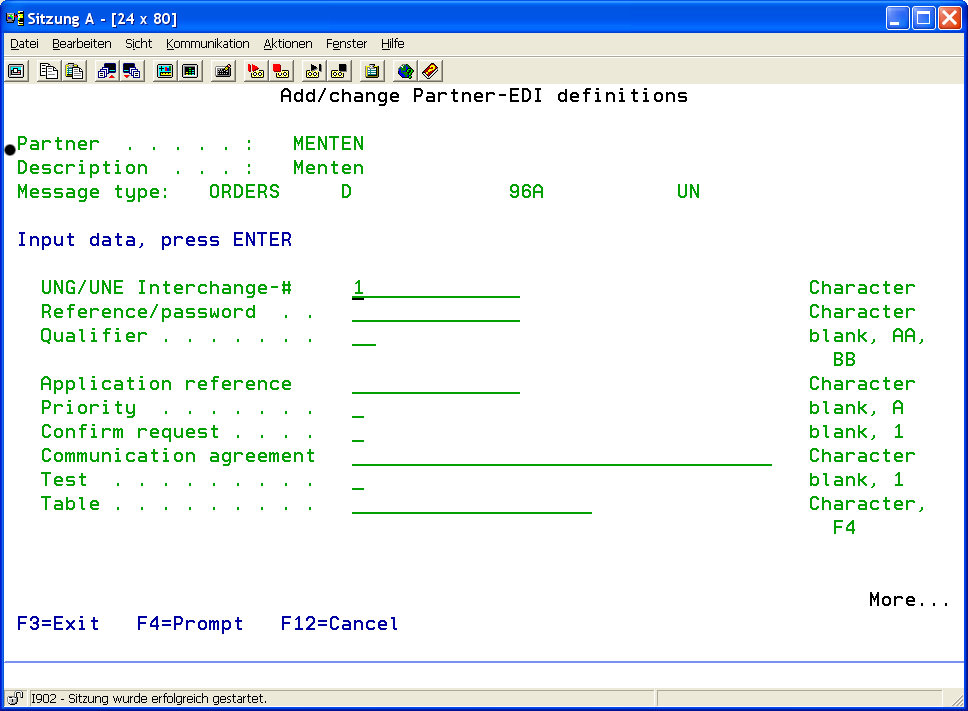
UNG/UNE Interchange # |
If a value is entered into this field, the field 0048 in the UNB segment will be filled with this value as soon as the function *GRPREF is used when mapping. After every group that has been generated for this partner, the displayed value is automatically increased by "1".
|
||||||||
|
Reference / Password |
If a value is entered into this field, the field S005-0022 in the UNB segment will be filled with this value as soon as the function *REFPW is used when mapping. |
||||||||
|
Qualifier |
If a value is entered into this field, the field S005-0025 in the UNB segment will be filled with this value as soon as the function *REFQUA is used when mapping. |
||||||||
|
Application Reference |
If a value is entered into this field, the field 0026 in the UNB segment will be filled with this value as soon as the function *APPREF is used when mapping. |
||||||||
|
Priority |
If a value is entered into this field, the field 0029in the UNB segment will be filled with this value as soon as the function *PRIO is used when mapping. |
||||||||
|
Acquisition Request |
If a value is entered into this field, the field 0031in the UNB segment will be filled with this value as soon as the function *ACQREQ is used when mapping. |
||||||||
|
Communication Request |
If a value is entered into this field, the field 0032in the UNB segment will be filled with this value as soon as the function *COMREQ is used when mapping. |
||||||||
|
Test |
If a value is entered into this field, the field 0035in the UNB segment will be filled with this value as soon as the function *TEST is used when mapping. |
||||||||
|
Table |
The name of the i-effect conversion table that is to be used for this conversion. The table must describe the conversion of the defined message type. Us function key F4 to display a list containing all loaded mapping tables. |
||||||||
|
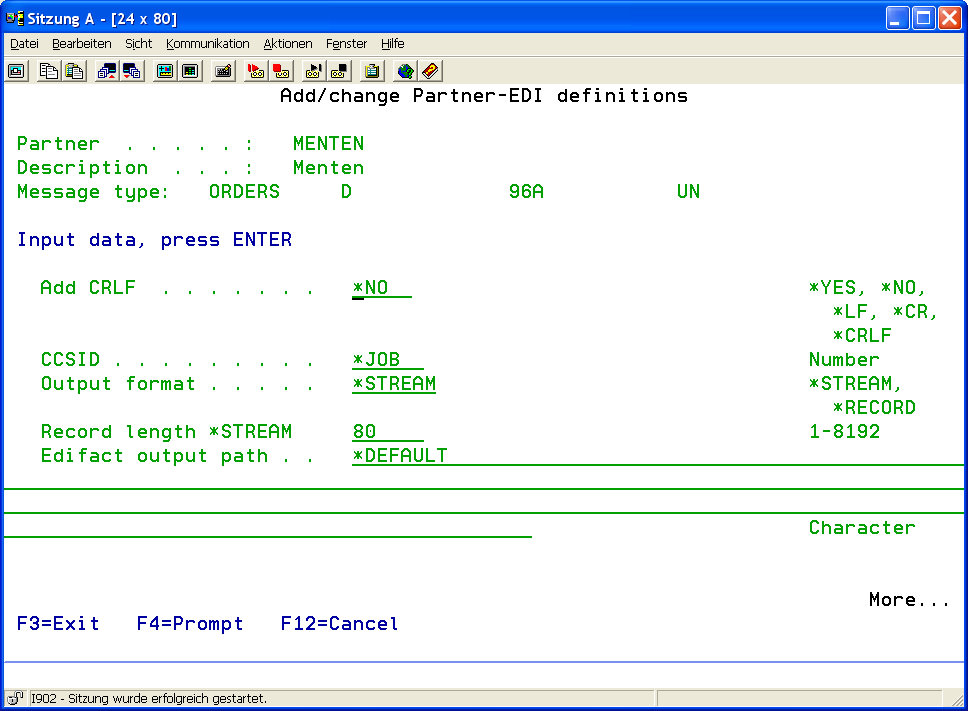
Insert CRLF |
Determines if CRLF control characters are to be inserted at the end of every generated EDIFACT segment.
|
||||||||
|
CCSID |
Enter a CCSID (Coded Character Set Identification) to convert EDIFACT files to the cor-responding character set when processing. Both EBCDIC and ASCII character sets can be defined. If source and destination CCSID are identical, transformation is not effected.
|
||||||||
|
Possible special values: |
|
||||||||
|
|||||||||
|
Output Format |
Only valid if output file system *DB2 is selected. This parameter defines the output format of the physical file into which EDIFACT data is written.
|
||||||||
|
Record Length *STREAM |
Only valid if output file system *DB2 is selected and output format *STREAM is defined. The generated EDIFACT file is created with the record length defined here. |
||||||||
|
EDIFACT Output Path |
Output path that is to be used for the currently edited partner and EDIFACT message type. The generated EDIFACT file is filed in this output path.
Possible special values
|
|
EDIFACT File Name |
The name of the generated EDIFACT file. The file name can be defined dynamically according to the models entered here. The following variables are possible: |
|
|
%MSGTYPE% |
Message type |
|
|
%APPREF% |
Application Reference |
|
|
%SENDER% |
Sender ID |
|
|
%RECIPIENT% |
Recipient ID |
|
|
%YEAR% |
Year YYYY |
|
|
%MONTH% |
Month MM |
|
|
%DAY% |
Day DD |
|
|
%INTREF% |
Interchange Reference (Interchange Number) |
|
|
%PARTNER% |
Assigned Partner Entry |
|
|
%TIMESTAMP% |
Timestamp of Generation of EDI file |
|
|
Different *TELEBOX Addressing - EDIFACT Productive |
This parameter allows selection of different addressing, depending on the test marker, to send data via the *TELEBOX module. If the selected EDIFACT message types are to be transmitted to the selected partner and if the file was created WITHOUT a test marker, the address entered here is valid (the entry under this alias) as data source of addressing definition. With the help of this parameter, an addressing differing between test and productive run can be realized without changing the UNB recipient alias. |
|
Different *TELEBOX Addressing - EDIFACT Test |
This parameter allows selection different addressing, depending on the test marker, to send data via the *TELEBOX module. If the selected EDIFACT message types are to be transmitted to the selected partner and if the file was created WITH a test marker, the address entered here is valid (the entry under this alias) as data source of addressing definition. With the help of this parameter, an addressing differing between test and productive run can be realized without changing the UNB recipient alias. |