
Use option 12 to select data for processing:
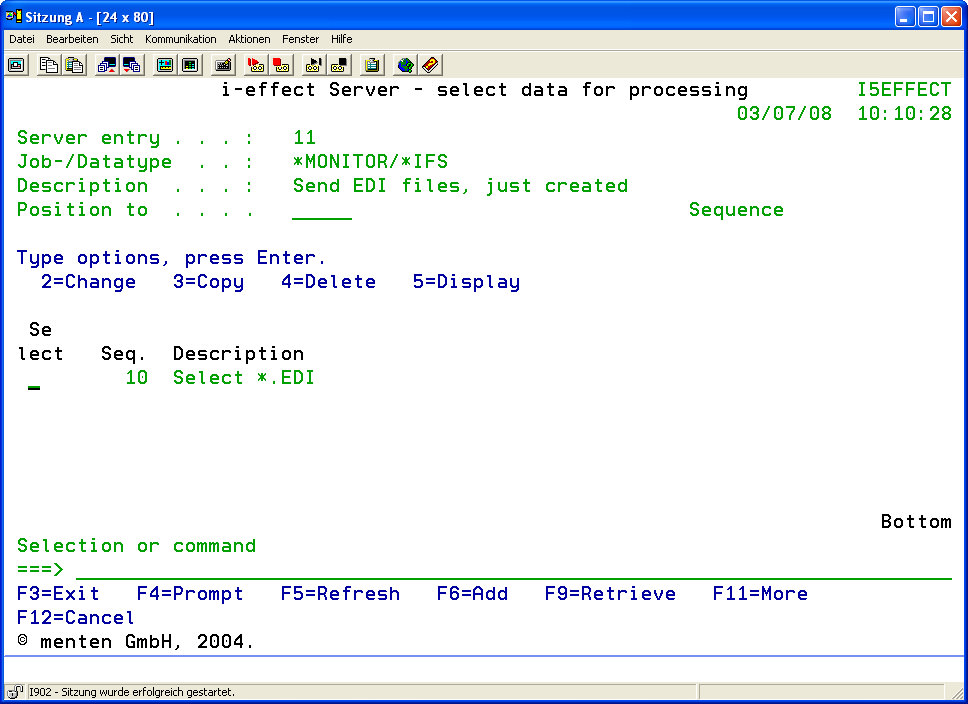
The parameters in the upper, static part of the display are taken from the main table and have the following meaning:
|
Server Entry |
The sequence number will be displayed. It assigns a unique number to the server entry in the main table. All entries in the table are associated to the server entry. Processes assigned to this server entry will be run with all of the chosen data. |
|
Job/File Type |
Displays the definition entered for the type of source file and the type of processing in the main dialogue. |
|
Description |
Displays the brief description of the server entry in the main table. |
|
Start List at |
The start of the display list may be repositioned here. Enter the sequence number of the desired entry. |
The tabular structured list entries contain the following:
|
Sequence |
The sequence number of the server entry is displayed in the data selection table. It assigns a unique number to the server entry in the main table. All entries in this display will be assigned to the corresponding entry in the main table. |
|
Description |
The brief description of the entry in the data selection table. |
|
Attributes |
The most important and last changed parameters of this entry are displayed here.
|
Use function key F6 to add entries to the data selection table (ADDSRVLTE).