
i-effect *OCSP is setup using a configuration dialog. To open the configuration dialog open the installation directory of i-effect - the integrated solution for IBM System i - and the sub directory OCSP.
In order to run the i-effect *OCSP dialog Java Runtime Edition Version 5 or higher must be installed on the client PC. The file "ocspConfigurationGUI.jar" is in the sub folder OCSP. Double clicking on it opens the configuration dialog.
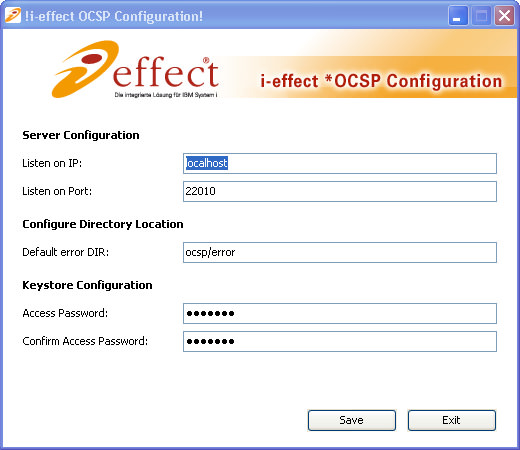
Program- Settings
The following explains the individual setting options in detail:
|
Server Configuration |
|
|
Bind to IP |
This is the IP Address, to which i-effect *OCSP-Subsystem is bound, to receive incoming verification jobs. The default value "localhost" has been preset. |
|
Bind to Port |
The port, to which the i-effect *OCSP- Subsystem is bound, to receive incoming verification jobs. The default "22010" has been preset. |
|
Directory Configuration |
|
|
Standard Error Directory |
The directory where all files that could not be verified are stored. |
|
Keystore Configuration |
|
|
Password |
The password that allows access to the keystore by the subsystem. Changing the password does not change the existing password of the keystore! |
|
Confirm Password |
Enter the password again to confirm that entry was correct. |