
The command "Convert Spooled File to Spooled File" converts a spooled file into one or more other spooled files.
-
To copy a spooled file.
-
It can be used for many different purposes:
-
To split a spooled file into several smaller spooled files, based on user defined criteria.
-
To remove unwanted pages from the spooled file.
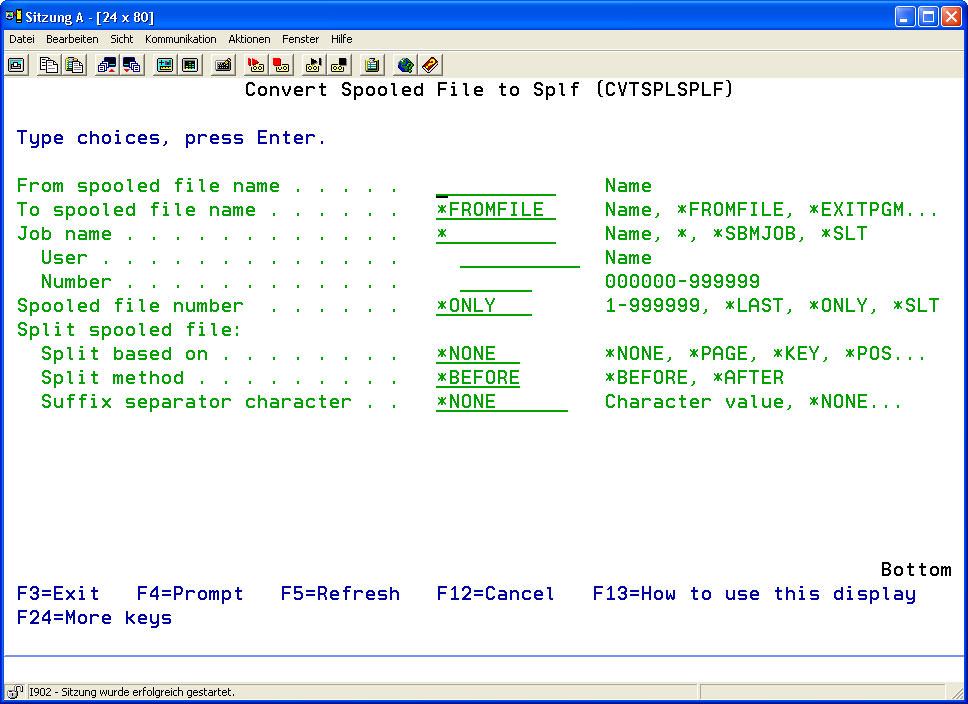
|
Spooled File (FILE) |
The description of this parameter can be found under Menu item 11: Convert spool file to PDF (CVTSPLPDF) Part 1 |
||||||||||||||||||
|
OUTPFILE |
The description of this parameter can be found under Menu item 11: Convert spool file to PDF (CVTSPLPDF) Part 1 |
||||||||||||||||||
|
JOBNAM |
The description of this parameter can be found under Menu item 11: Convert spool file to PDF (CVTSPLPDF) Part 1 |
||||||||||||||||||
|
SPLNBR |
The description of this parameter can be found under Menu item 11: Convert spool file to PDF (CVTSPLPDF) Part 1 |
||||||||||||||||||
|
SPLIT |
The description of this parameter can be found under Menu item 11: Convert spool file to PDF (CVTSPLPDF) Part 1 |
||||||||||||||||||
|
SPLITPAGE |
The description of this parameter can be found under Menu item 11: Convert spool file to PDF (CVTSPLPDF) Part 1 |
||||||||||||||||||
|
SPLITPOS |
The description of this parameter can be found under Menu item 11: Convert spool file to PDF (CVTSPLPDF) Part 1 |
||||||||||||||||||
|
SPLITKEY |
The description of this parameter can be found under Menu item 11: Convert spool file to PDF (CVTSPLPDF) Part 1 |
||||||||||||||||||
|
EXITPGM |
The description of this parameter can be found under Menu item 11: Convert spool file to PDF (CVTSPLPDF) Part 1 |
||||||||||||||||||
|
EXITPGMPRM |
The description of this parameter can be found under Menu item 11: Convert spool file to PDF (CVTSPLPDF) Part 1 |
||||||||||||||||||
|
EXITPGMPOS |
The description of this parameter can be found under Menu item 11: Convert spool file to PDF (CVTSPLPDF) Part 1 |
||||||||||||||||||
|
EXITPGMKEY |
The description of this parameter can be found under Menu item 11: Convert spool file to PDF (CVTSPLPDF) Part 1 |
||||||||||||||||||
|
EXCLPAGNBR |
The description of this parameter can be found under Menu item 11: Convert spool file to PDF (CVTSPLPDF) Part 1 |
||||||||||||||||||
|
EXCLPAGKEY |
The description of this parameter can be found under Menu item 11: Convert spool file to PDF (CVTSPLPDF) Part 1 |
||||||||||||||||||
|
Owner of the New Spooled File (OWNER) |
Determines the user, who is the owner of the spooled file(s) being created.
|
||||||||||||||||||
|
Output Priority (OUTPTY) |
Determines the output priority to be assigned to the new spooled file.
|
||||||||||||||||||
|
Output Queue (OUTQ) |
Defines the output queue in which the new spooled file(s) will be created.
There are two further parameters:
|