
-
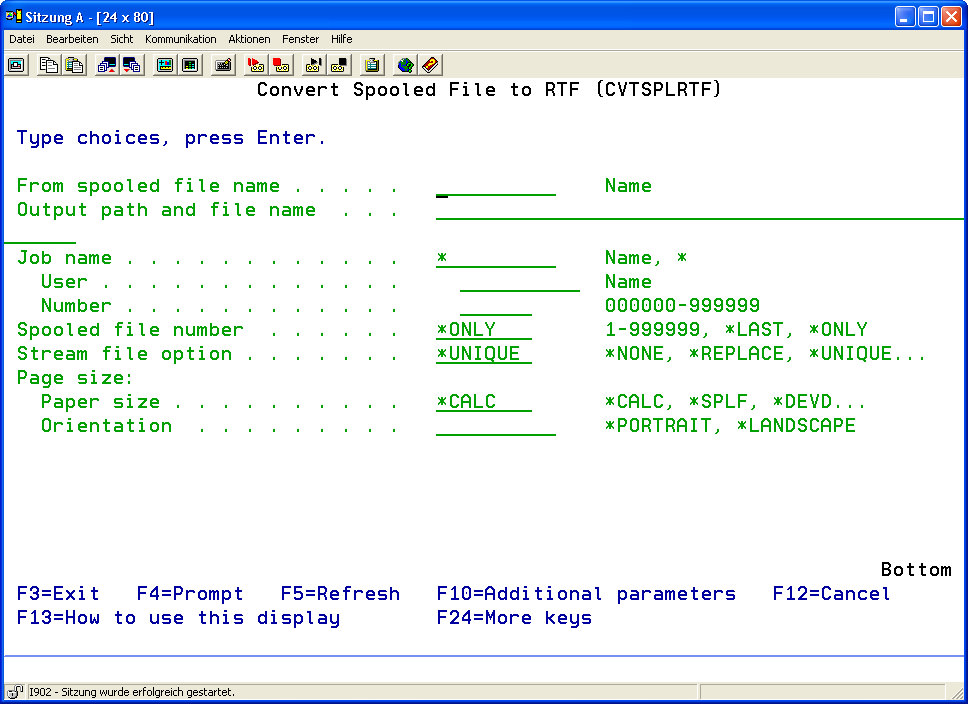
Choose menu item 12 "Convert Spool into RTF" or enter the command CVTSPLRTF to convert spooled files into RTF files. From the interactive program WRKEFSPLF (Work with i-effect Spooled Files) option 11 can be entered in front of the desired line. In the appearing program interface, enter *RTF next to conversion, under conversion configuration.
-
Enter the desired parameters, which are described here.
RTF is the common format to then further process your soldiers in modern word processors.
The (CVTSPLRTF) command converts spooled files to stream files in RTF (Rich Text Format). RTF is a common format used to process spooled files with a modern word processor.
If a word processing application will be used to access the spooled file data, RTF is the format to choose.
RTF (Rich Text Format) is a format understood and handled by most, if not all, modern WP programs, including MS Word, Lotus WordPro, MS WordPad etc.
|
Spooled File (FILE) |
The description of this parameter can be found under Menu item 11: Convert spool file to PDF (CVTSPLPDF) Part 1 |
||||||||||||||||||||||||||||||||||||||||
|
OUTPFILE |
The description of this parameter can be found under Menu item 11: Convert spool file to PDF (CVTSPLPDF) Part 1 |
||||||||||||||||||||||||||||||||||||||||
|
JOBNAM |
The description of this parameter can be found under Menu item 11: Convert spool file to PDF (CVTSPLPDF) Part 1 |
||||||||||||||||||||||||||||||||||||||||
|
SPLNBR |
The description of this parameter can be found under Menu item 11: Convert spool file to PDF (CVTSPLPDF) Part 1 |
||||||||||||||||||||||||||||||||||||||||
|
STMFOPT |
The description of this parameter can be found under Menu item 11: Convert spool file to PDF (CVTSPLPDF) Part 1 |
||||||||||||||||||||||||||||||||||||||||
|
PAGESIZE |
The description of this parameter can be found under Menu item 11: Convert spool file to PDF (CVTSPLPDF) Part 1 |
||||||||||||||||||||||||||||||||||||||||
|
CUSTOMPAGE |
The description of this parameter can be found under Menu item 11: Convert spool file to PDF (CVTSPLPDF) Part 1 |
||||||||||||||||||||||||||||||||||||||||
|
PRTDEV |
The description of this parameter can be found under Menu item 11: Convert spool file to PDF (CVTSPLPDF) Part 1 |
||||||||||||||||||||||||||||||||||||||||
|
PAGEOPTION |
The description of this parameter can be found under Menu item 11: Convert spool file to PDF (CVTSPLPDF) Part 1 |
||||||||||||||||||||||||||||||||||||||||
|
SPLIT |
The description of this parameter can be found under Menu item 11: Convert spool file to PDF (CVTSPLPDF) Part 1 |
||||||||||||||||||||||||||||||||||||||||
|
SPLITPAGE |
The description of this parameter can be found under Menu item 11: Convert spool file to PDF (CVTSPLPDF) Part 1 |
||||||||||||||||||||||||||||||||||||||||
|
SPLITPOS |
The description of this parameter can be found under Menu item 11: Convert spool file to PDF (CVTSPLPDF) Part 1 |
||||||||||||||||||||||||||||||||||||||||
|
SPLITKEY |
The description of this parameter can be found under Menu item 11: Convert spool file to PDF (CVTSPLPDF) Part 1 |
||||||||||||||||||||||||||||||||||||||||
|
EXITPGM |
The description of this parameter can be found under Menu item 11: Convert spool file to PDF (CVTSPLPDF) Part 1 |
||||||||||||||||||||||||||||||||||||||||
|
EXITPGMPRM |
The description of this parameter can be found under Menu item 11: Convert spool file to PDF (CVTSPLPDF) Part 1 |
||||||||||||||||||||||||||||||||||||||||
|
EXITPGMPOS |
The description of this parameter can be found under Menu item 11: Convert spool file to PDF (CVTSPLPDF) Part 1 |
||||||||||||||||||||||||||||||||||||||||
|
EXITPGMKEY |
The description of this parameter can be found under Menu item 11: Convert spool file to PDF (CVTSPLPDF) Part 1 |
||||||||||||||||||||||||||||||||||||||||
|
Font (FONT) |
This parameter determines how i-effect handles fonts when creating a stream file from a spooled file.
This parameter contains 2 elements:
|
||||||||||||||||||||||||||||||||||||||||
|
CVTFONTID |
The description of this parameter can be found under Menu item 11: Convert spool file to PDF (CVTSPLPDF) Part 1 |
||||||||||||||||||||||||||||||||||||||||
|
CVTFNTRSC |
The description of this parameter can be found under Menu item 11: Convert spool file to PDF (CVTSPLPDF) Part 1 |
||||||||||||||||||||||||||||||||||||||||
|
TEXT |
The description of this parameter can be found under Menu item 11: Convert spool file to PDF (CVTSPLPDF) Part 1 |
||||||||||||||||||||||||||||||||||||||||
|
DBCS |
The description of this parameter can be found under Menu item 11: Convert spool file to PDF (CVTSPLPDF) Part 1 |
||||||||||||||||||||||||||||||||||||||||
|
RTF Options (RTF) |
Allows the setting of margins and other factors governing the appearance of text in a RTF document.
This parameter contains 6 elements:
|
||||||||||||||||||||||||||||||||||||||||
|
COLOR |
The description of this parameter can be found under Menu item 11: Convert spool file to PDF (CVTSPLPDF) Part 1 |
||||||||||||||||||||||||||||||||||||||||
|
EXCLPAGNBR |
The description of this parameter can be found under Menu item 11: Convert spool file to PDF (CVTSPLPDF) Part 1 |
||||||||||||||||||||||||||||||||||||||||
|
EXCLPAGKEY |
The description of this parameter can be found under Menu item 11: Convert spool file to PDF (CVTSPLPDF) Part 1 |
||||||||||||||||||||||||||||||||||||||||
|
RSCDIR |
The description of this parameter can be found under Menu item 11: Convert spool file to PDF (CVTSPLPDF) Part 1 |
||||||||||||||||||||||||||||||||||||||||
|
STMFCODPAG |
The description of this parameter can be found under Menu item 11: Convert spool file to PDF (CVTSPLPDF) Part 1 |
||||||||||||||||||||||||||||||||||||||||
|
SPLFCCSID |
The description of this parameter can be found under Menu item 11: Convert spool file to PDF (CVTSPLPDF) Part 1 |
||||||||||||||||||||||||||||||||||||||||
|
AUT |
The description of this parameter can be found under Menu item 11: Convert spool file to PDF (CVTSPLPDF) Part 1 |
||||||||||||||||||||||||||||||||||||||||