Within the system there are a number of tasks.
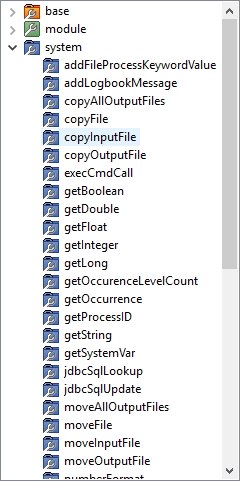
Following tasks are available:
|
Tasks |
Description |
|---|---|
|
addFileProcessKeywordValue |
Sets a value for a keyword, the process tracking. In this process, then a new entry with this key and the corresponding value is added. Keys can also be edited in the file index in configuration.xml Mapper / conf directory on the AS400 machine.
|
|
addLogbookMessage |
Adds a new entry into the logbook of this session. |
|
copyAllOutputFiles |
This task copies all output files in a new destination (if the destination module multiple files are created).
|
|
copyFile |
This task copies a source file to a specified target file. the destination file already exists, it is overwritten. Source and destination files must be specified with an absolute path. |
|
copyInputFile |
This task copies the input file to a new destination.
|
|
copyOutputFile |
This task copies the output file to a new destination. Only the most recently generated output file is marked for copying (if no output file is generated, this results in an error).
|
|
execCmdCall |
Executes a system command on your system. |
|
getBoolean |
Returns the value of the variable supplied as a Boolean. |
|
getDouble |
Returns the value of the variable supplied as a Double. |
|
getFloat |
Returns the value of the variables delivered back as a float. |
|
getInteger |
Returns the value of the variable supplied as an integer. |
|
getLong |
Returns the value of the variable supplied back as Long. |
|
getOccurenceLevelCount |
Returns the number of source key levels (Key Parts) back.
|
|
getOccurence |
Is the presence of the desired key part (index - starting at 0). Example: DB (-1); CONNECT ID (-1); DBSystem (-1); SCHEMA (-1); TABLE (2); COLUMN (1) returns 2. |
|
getProcessID |
Searches for a process based on the specified parameters. On success, returns the UNIQUE_ID. On error, delivered returns -1. The variables must be registered as a keyword values for the desired mapping.
|
|
getString |
Returns the value of the transferred variable back as a String data type.
|
|
getSystemVar |
This task reads an environment variable of type * SYS on the system. this variable does not exist, an empty string is returned
|
|
jdbcSqlLookup |
With this task you can read by a special SQL queries data in a database whose connection is defined by the dbURL. The query may provide only ONE value as a result set!
The url is encrypted in the .map file saved!
For reasons of technical license are Java driver for each database systems not present. Download from the respective database vendor in the form of a .jar file and place them this from the following location:
|
|
jdbcSqlUpdate |
With this task you can UPDATE, INSERT or DELETE execute SQL statements. |
|
moveAllOutputFfiles |
This task moves all output files in a new destination (instead of the output path of Runmap command).
|
|
moveFile |
This object moves a source file to a new destination. Source and destination files must be specified with an absolute path.
The destination directory must already exist.
|
|
moveInputFile |
This task shifts the input file to a new destination (instead of the error path of Runmap command. If the mapping is successful, the input file is simply the archive COPIED).
|
|
moveOutputFile |
This task shifts the output file to a new destination (instead of the output path of Runmap command). Only the most recently generated output file is marked for moving (if no output file is generated, this results in an error).
|
|
numberFormat |
Formats a number in the format desired. Please refer http://docs.oracle.com/javase/6/docs/api/java/text/DecimalFormat.html |
|
resetVar |
Sets the value of the transferred variable back to the initial value. |
|
retrieveFileTimeStamp |
Returns the timestamp of the file. |
|
runReport |
Triggers a RunReport. |
|
setBoolean |
Sets the passed value as the new value of the variable. |
|
setDouble |
Sets the passed value as the new Double value of the variable. |
|
setFloat |
Sets the passed value as the new Float value of the variable. |
|
setInteger |
Sets the passed value as the new Integer value of the variable. |
|
setLong |
Sets the passed value as the new Long value of the variable. |
|
setOccurence |
Sets the desired occurrence value to the target element OccurenceLevel.
In this case the source value in the DTM would, 2380 of the third message is mapped, as the OccurenceLevel 5 represents the BGM (the message) and the OccurenceValue 3, the third.
|
|
setOutputFileName |
This task moves the next output files in a new destination (instead of the output path of Runmap command). If so stated before the output file is created / registered.
|
|
setProcessID |
Set the process ID of the current session. |
|
setString |
Returns the entered value as a string. 
|
|
setSystemVar |
This task is an environment variable of type * SYS on the system. Exist this variable, it is replaced. |
|
setToError |
Cancels the current mapping process and sets the status to ERROR. |
|
sqlLookup |
With this task, you can use SQL queries to read specific data from the (System i) database. If the SELECT-back return more than one result is accurate only taken the first result. If no result exists, an empty string is returned. |
|
sqlUpdate |
This task SQL statements of type UPDATE / INSERT / DELETE can be executed on the database of the mapper-core system. The result provides the number of lines involved, or -1 if no changes have been made. |
|
startServerTask |
Starts a I EFFECT server task. If this error has occurred, these have no effect mapping. |
|
transferOccurence |
Takes the occurrence of the specified source code level and sets it to the specified target key at the specified level (targetOccurenceLevel) as the new value. |