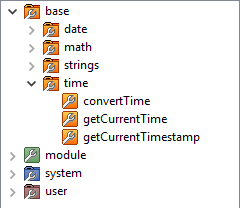
Within the tasks of base you can find more job categories. These include:
-
date
-
math
-
strings
-
time
Date
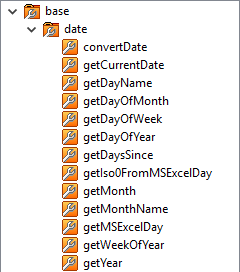
Within date there are a number of tasks that deal with Dati.
The following file formats are available:
|
Format Name |
Syntax |
Example Value |
|---|---|---|
|
*YMD |
yy-MM-dd |
16-02-01 |
|
*YMD0 |
yyMMdd |
160201 |
|
*YMD. |
yy.MM.dd |
16.02.01 |
|
*CYMD |
yyyy-MM-dd |
2016-02-01 |
|
*CYMD0 |
yyyyMMdd |
20160201 |
|
*DMY |
dd-MM-yy |
01-02-16 |
|
*DMY0 |
ddMMyy |
010216 |
|
*DMY. |
dd.MM.yy |
01.02.16 |
|
*DMCY |
dd-MM-yyy |
01-02-2016 |
|
*DMCY0 |
ddMMyyyy |
01022016 |
|
*DMCY. |
dd-MM-yyyy |
01-02-2016 |
|
*DMCY0 |
ddMMyyy |
01022016 |
|
*DMCY. |
dd.MM.yyyy |
01.02.2016 |
|
*ISO |
yyyy-MM-dd |
2016-02-01 |
|
*ISO0 |
yyyyMMdd |
2016-02-01 |
|
*DATE7 |
CyMMd |
1160201 |
|
Task |
Description |
|---|---|
|
convertDate |
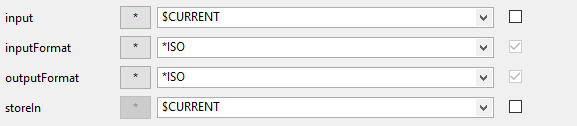
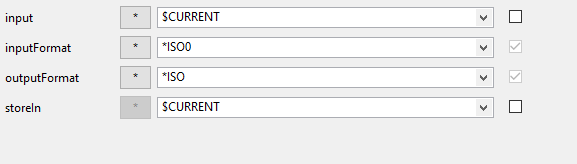
Converts a date of input with a specific input format in a specific output format. Converts 20160201 (* according to ISO 0 → yyyy MM dd) in 2016-02-01 (* according to ISO → yyyy-MM-dd). The value is then stored back into §CURRENT. |
|
getCurrentDate |
Determines the current date in the specified format output. |
|
getDayName |
Returns the name of the current day. |
|
getDayOfMonth |
Returns the name of the currennt month. |
|
getDayOfWeek |
Returns the current day of the week. |
|
getDayOfYear |
Returns the current day of the year. |
|
getDaysSince |
Calculates the days between two dates:
|
|
getIso0FromMSExcelDay |
Calculates an ISO 0 Date of Excel date (days since 01/01/1990).
|
|
getMonth |
Returns the current month: |
|
getMonthName |
Returns the current month name. |
|
getMSExcelDay |
Is the MS Excel returns an integer value for an input ISO 0-date. |
|
getWeekofYear |
Returns the calendar week of the year for an ISO 0 date back: |
|
getYear |
Returns the current year: 2 - Without century 4 - With Century |











Math
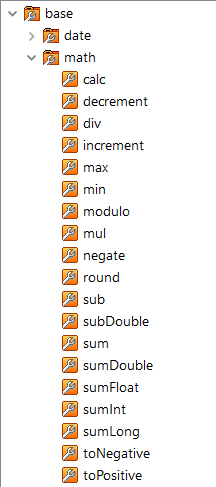
Within Math there are a number of tasks that deal with mathematical functions.
|
Tasks |
Description |
|---|---|
|
calc |
Any mathematical calculation operations. For example: (7^4)-(2*3) +4 |
|
decrement |
Decrease the counter by 1. |
|
div |
Divides the Input / Value. |
|
increment |
Increase the counter by 1. |
|
max |
Comparing Input and comparator and provides the higher value. For example, CURRENT = 1 and Comparator = 2. The function returns 2 back. |
|
min |
Comparing Input and comparator and provides the higher value. For example, CURRENT = 1 and Comparator = 2. The function returns 1. |
|
modulo |
Returns the remainder of the division (modulo). For example, CURRENT = 3 and divisor = 2. THe function returns 1. |
|
mul |
Multiplies two values. |
|
negate |
Changes the sign. E.g. +5 -> -5 |
|
round |
Rounds the entered value to the desired decimal: Count is the digits after the decimal point. |
|
sub |
Subtraction of input - value |
|
subDouble |
Subtracting double figures: input - value |
|
sum |
Summing input and value. |
|
sumDouble |
Sums double figures: input + value. |
|
sumFloat |
Sums float numbers: input + add value |
|
sumInt |
Sums two integer values: input + add Value |
|
sumLong |
Sums two long values: input + add Value |
|
toNegative |
Negates the input value. |
|
toPositive |
Returns the magnitude of a negative value. |















Strings
Within strings there are a number of tasks that deal with strings.
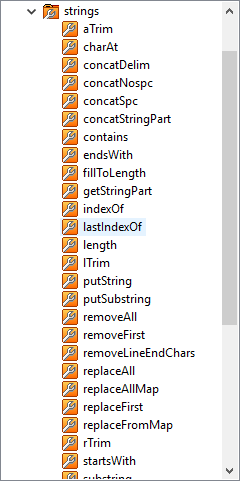
|
Tasks |
Description |
|---|---|
|
aTrim |
Removes leading and terminal "White Spaces" such as tabs, spaces, and newline characters. |
|
charAt |
Is the character of a specified location within a string back. Narrated by CURRENT = test the character at position 1: Previous T |
|
concatDelim |
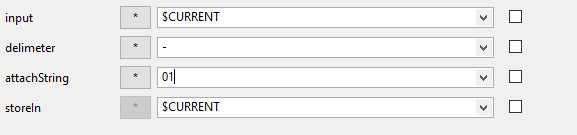
Concatenating two strings into a new string using the specified character as a delimiter. Narrated by CURRENT = test the new value test 01 back. |
|
concatNospc |
Direct concatenate two strings together into a new string. (Without delimiter) |
|
concatSpc |
Concatenating two strings into a new string with a space as a separator. |
|
concatStringPart |
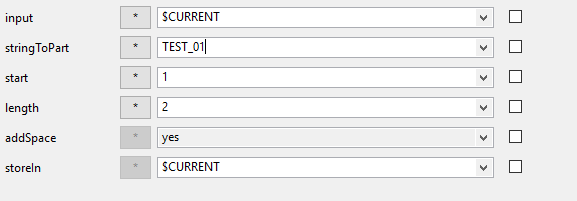
Depends on the input string part of a second string. The new string is stored in the specified variable (default: CURRENT). At CURRENT = Test. Returns the value: Reset TEST TE. |
|
contains |
Returns TRUE and FALSE. Finds the in specified search string in input . |
|
endsWith |
Checks if a string to the value of, endstring 'ends. If the string ends with the specified value, TRUE is returned, otherwise FALSE. |
|
fillToLength |
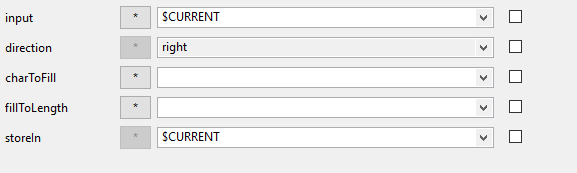
Attaches a fill character to a given string until the desired length is reached. Based on the given direction, characters are attached to the character string on the left or right.
|
|
getStringPart |
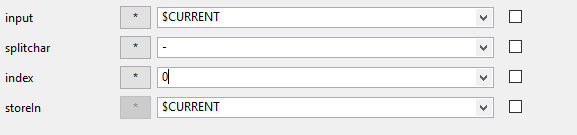
Returns the substring at the specified index. For index 0, the last part is returned. is the position of the back track levels substring (index 0 is the last). splitchar is the separator to be used. |
|
indexOf |
Returns the index to within the string of the first occurrence of the specified substring. |
|
lastIndexOf |
Returns the index within this string of the rightmost occurrence of the specified string.
|
|
length |
Returns the length of the input string.
|
|
Itrim |
Removes leading "white spaces" such as tabs, spaces, and newline characters. |
|
putString |
A special task for merging several source strings that are to be mapped as a value in a target field. This task can only be used in conjunction with "additionals". |
|
putSubString |
The function inserts a character string into an existing one. The existing content is overwritten and filled to the specified length with blanks. |
|
removeAll |
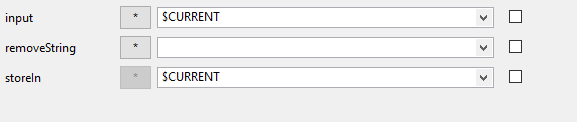
Removes all occurrences of remove string in input. |
|
removeFirst |
Removes the first occurrence of string remove in input. |
|
removeLineEndChars |
Removes every occurrence of a newline character (CRLF) from the given string.
|
|
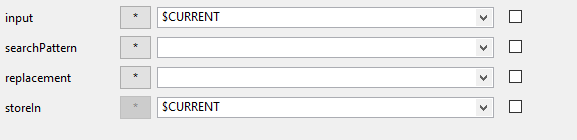
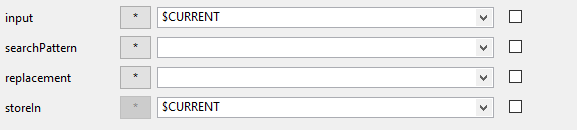
replaceAll |
Replace all occurrences of based on a passed regular expression found substring with the given replacement string. |
|
replaceAllMap |
This task takes in the string in the parameter "Input" values from the substitution list specified in the parameter "replacementMap" and replaces it with the listed replacement values. It will replace all occurrences found. The final string is stored in the parameter "StoreIn" In order to replace, for example, German umlauts in a string the following assignment list are used: replaceAllMap(„ö:oe,ä:ae,ü:ue,ß:ss,Ö:OE,Ä:AE,Ü:UE") |
|
replaceFirst |
Replaces the first occurrence of based a passed regular expression found substring with the given replacement string. |
|
replaceFromMap |
This task compares the string in the parameter input with the comparison values from the Replace Map. When a comparison value matches, the associated replacement value in storeIn is stored.
Example: replace = def Map: Hello, Abc: World, else value '[input = Abc store Add = World] [input = def storeIn = Hello] [input = aef storeIn = else_Value]
(compare_value:replacement_value,compare_value2,replace_value2...,else_value) |
|
rTrim |
Removes terminal "white spaces" such as tabs, spaces, and newline characters.
|
|
startsWith |
Checks if a string with the value of "start string" begins. If the string starts with the specified value, TRUE is returned, otherwise FALSE. |
|
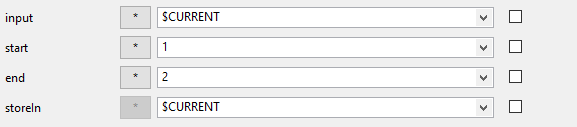
substring |
Extracts a part string from the position set in 'start' to the end position of the input string. |
|
substringLeft |
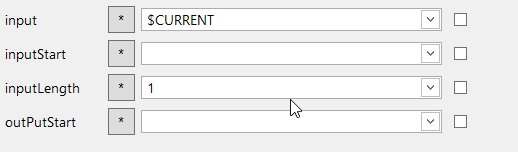
Extracts the left part of the input string with a given length and returns it as a new substring. |
|
substringRight |
Extracts the right part of the input string with a given length and returns it as a new substring.
|
|
substringToEnd |
Extracts a part of a string beginning with the in "start" you passed up to the specified end position of the input string. |
|
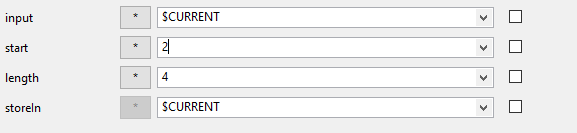
subStringToLength |
Extracts a substring from a given string, beginning with the set start index in the specified length. |
|
toLower |
Converts string to lowercase. |
|
toUpper |
Converts string to uppercase. |
|
trimLeadingZeros |
Removes leading zeros. |
|
trimTrailingZeros |
Removes terminal zeros. |













Time
Within Time there are a number of tasks that deal with time functions.
The following timeformats are available:
|
Format Name |
Syntax |
Example Value |
|---|---|---|
|
*HMS0 |
HHmmss |
135026 |
|
*ISO0 |
HHmmss |
135026 |
|
*HMS |
HH:mm:ss |
13:50:26 |
|
*ISO |
HH:mm:ss |
13:50:26 |
|
*HMS24 |
HH:mm:ss |
13:50:26 |
|
*HMS12 |
HH:mm:ss a |
01:50:26 PM |
|
*HMS024 |
HHmmss |
135026 |
|
*HMS012 |
HHmmss a |
015026 PM |
|
*HMS.24 |
HH.mm.ss |
13.50.26 |
|
*HMS.12 |
HH.mm.ss |
01.50.26 PM |
|
*HMS-24 |
HH-mm-ss |
13-50-26 |
|
*HMS-12 |
HH-mm-ss |
01-50-26 PM |
|
*HM24 |
HHmm |
13:50 |
|
*HM12 |
HHmm a |
01:50 PM |
|
*HM024 |
HHmm |
1350 |
|
*HM012 |
HHmm a |
0150PM |
|
*HM.24 |
HH.mm |
13.50 |
|
*HM.12 |
HH.mm a |
01.50 PM |
|
*HM-24 |
HH-mm |
13-50 |
|
*HM-12 |
HH-mm a |
01-50 PM |
|
Task |
Description |
|---|---|
|
convertTime |
Converts an input to the corresponding output format. |
|
getCurrentTime |
Returns the current time back in the desired output format. |
|
getCurrentTimestamp |
Returns either a UNIX or a DB timestamp back. |