
To start a signature job, calling up the green screen from i-effect - the integrated solution for IBM Power Systems - is required.
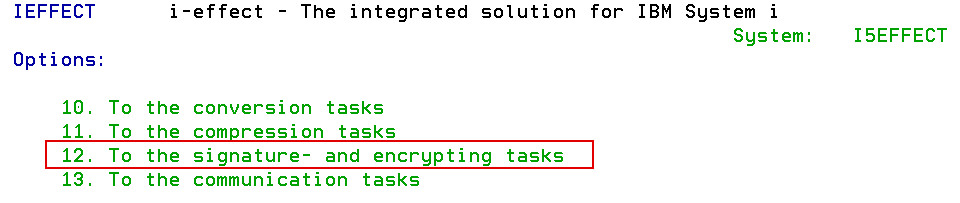
To get to the menu for encryption and signatures, enter 12 in the i-effect main menu and press enter.
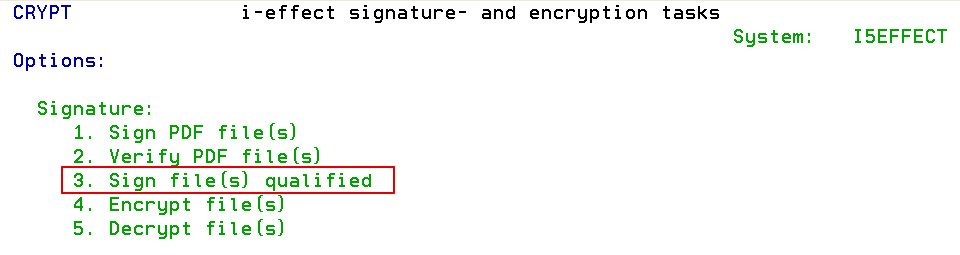
By choosing menu item 3 and pressing enter, a job for the generation of a qualified signature can be created.
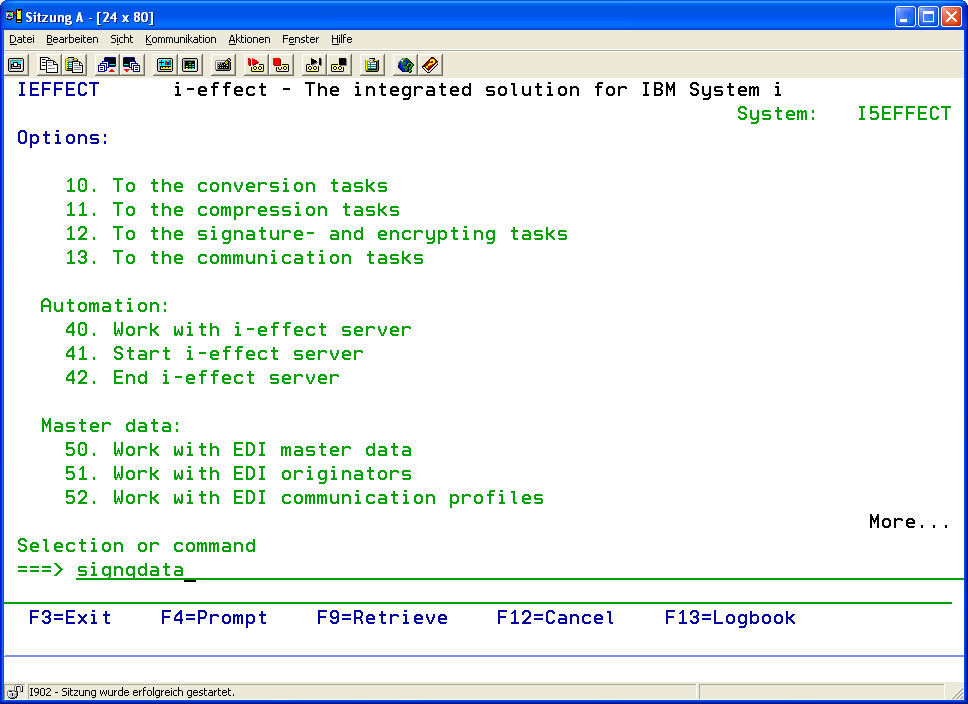
Alternatively, the parameters of "signqdata" will be displayed by entering the command signqdata and F4.
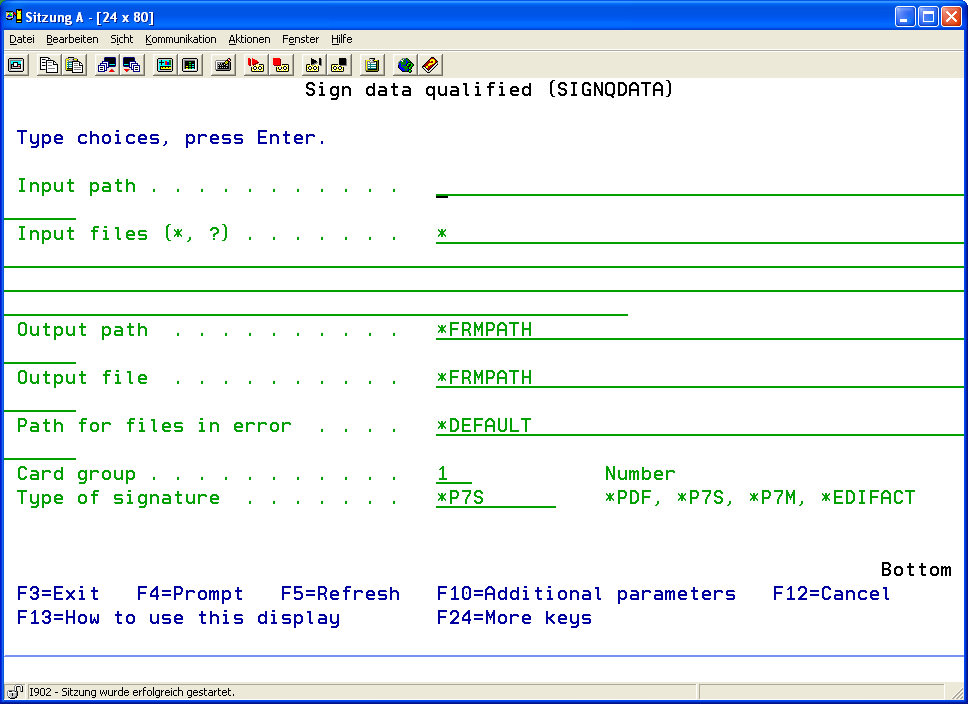
The functions for performing signature jobs can be determined here. Depending on signature type, there are up to three parameter pages, where the respective parameters can be specified.
Note:
The command signqdata exclusively creates signature jobs, which i-effect. sends from the IBM Power Systems to the signature server (i-effect *SIGG). The signature job transfers information about the data, which is to be signed, and in which form the data will be signed. In order to avoid misuse of i-effect *SIGG, the security concept of the IBM Power Systems allows the user to define authorized user for the command signqdata.
On the first page, the basic paramter settings are made, such as file path entry and the selection of signature setting type. The selection of signature setting type sets the configuration dialog according to the settings.
By pressing F10 further pages of parameters, based on previous selections, can be displayed and paged through using the scrolling keys. F9 displays all parameters of the command.
|
Input Path [FRMPATH] |
The absolute path of the file to be signed. |
|
|
Input File(*,?) [FRMIFSFILE] |
The file name of the files to be signed. |
|
|
Output Path [TOPATH] |
Optional: Absolute path of the output directory.
Default: |
|
|
*FRMPATH |
Goes through the acquisition of the input path to the file to be signed. |
|
|
Output File [TOFILE] |
Optional: File name under which the signed file will be saved.
Default: |
|
|
*FRMPATH |
Uses file name of the input file. |
|
|
In the case of PDF signatures, the original file name will be used. If *FRMPATH is selected in the TOPATH parameter, the successfully signed PDF file will replace the original. ".p7" will be added to the file name if a P7S signature is used. ".p7m" will be added to the file name if a P7M signature is used. In the case of EDIFACT signatures, the original file name will be used. If *FRMPATH is selected in the TOPATH parameter, the successfully signed EDIFACT file will replace the original. |
||
|
Path for Error Data [ERRPATH] |
Optional: Path of the error directory where files that were not correctly signed will be stored. Default: |
|
|
*DEFAULT |
Uses the default error directory. It can be found in the i-effect installation directory under sigg/error. |
|
|
Card Group [CARDGROUP] |
It is possible to assign slots to card groups. The card groups enable the user to generate one signature with one specific card. The signature job can only be performed by the slot that belongs to the corresponding card group. |
|
|
Signature Type [SIGTYPE] There are four different signature types: |
|
The signature is embedded in the PDF document. |
|
*P7S |
The signature is saved in a separate ".p7" file |
|
|
*PKCS7 |
The signature is packed and saved as a file in the ‚SignedData'-Container in the ASN.1 format. |
|
|
*P7M |
The signature is saved with the file in a new ".p7m" file. |
|
|
*EDIFACT |
"Attached Digital Signature" according to EANCOM 2002 Syntax 4. All or only one message type will be signed. The signature(s) will be embedded in the original file. |
|
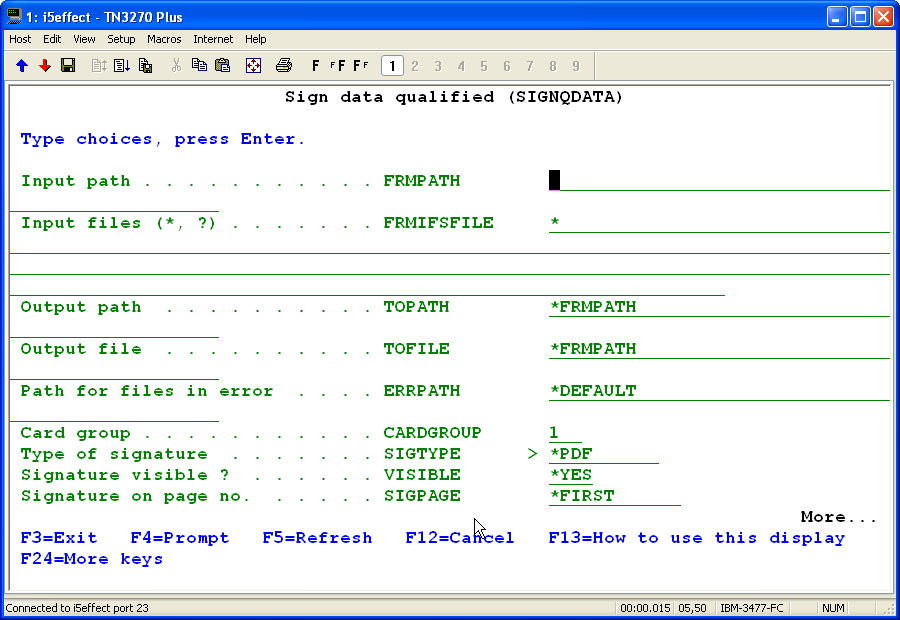
Configuration for the Creation of PDF-Signatures:
If *PDF is selected as signature type, specific parameters that only apply to PDF signatures will appear on the first configuration page.
|
Visible Signature [VISIBLE] |
Only PDF signatures! Determines if the signature is visible in the PDF document.
Default: |
||||||||
|
*YES |
Yes, the signature is visible. |
||||||||
|
*NO |
No, the signature is not visible. |
||||||||
|
Signature on Page No. [SIGPAGE] |
Only PDF signatures! Determines the page on which the signature will appear.
Default: |
||||||||
|
*FIRST |
The embedded signature will appear on the first page. |
||||||||
|
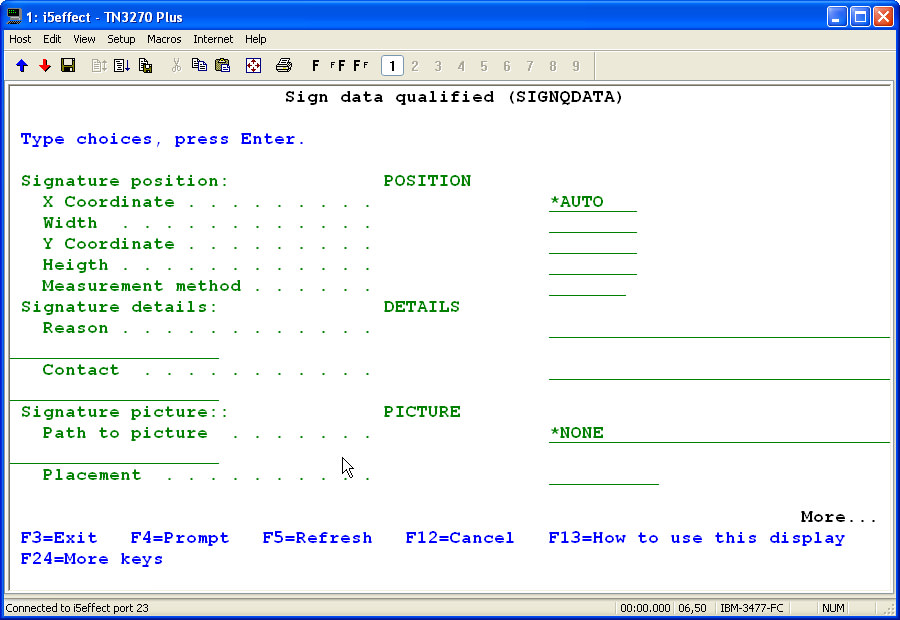
Configuration-Page 2 of "signqdata" (This form only applies to signature type *PDF): |
||||||||
|
Signature Position [POSITION]
|
Only PDF Signature! |
||||||||
|
X-coordinate
|
Distance between the signature display and the left side of the PDFdocument. Default: |
||||||||
|
|
|||||||||
|
x-coordinate: 1 width: 5 y-coordinate: 1 Height: 2 Unit of measurement: cm |
|||||||||
|
Width |
Width of the signature in the PDF document. |
||||||||
|
Y-Coordinate |
Distance between the signature and the bottom of the PDF document. |
||||||||
|
Height |
Height of the signature in the PDF document. |
||||||||
|
Unit of measurement. |
Unit of measurement for the coordinates, width, and height, which determine the position in the PDF document. |
||||||||
|
Signature Details [DETAILS] |
Only PDF signatures! |
||||||||
|
Reason |
Optional: Reason for the signing the PDF document. |
||||||||
|
Contact |
Optional: Contact information. |
||||||||
|
Signature Picture [PICTURE] |
Only PDF signatures! |
||||||||
|
Path to the Image File |
Optional: The path to the image file used as background for the visible signature in the PDF document.
Default: |
||||||||
|
|
|||||||||
|
Alignment |
Optional: Determines the position of the image within the signature.
|
||||||||
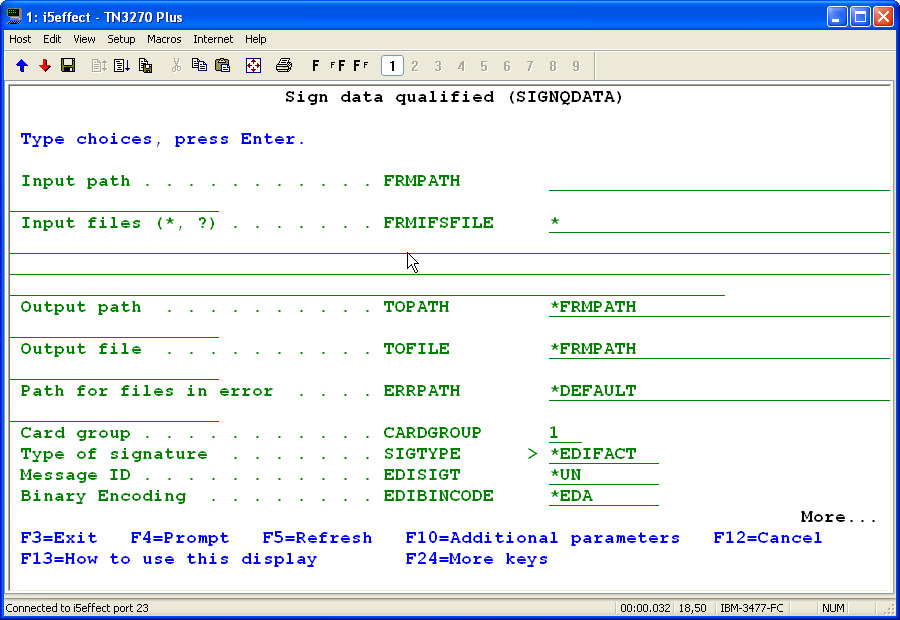
Configuration for the Creation of an EDIFACT-Signature:
If *EDIFACT is selected as signatur type, specific parameters that only apply to EDIFACT signatures will appear on the first configuration page.
|
Signature Type [EDISIGT] |
The type or format of the EDIFACT signature can be specified here.
There are 4 types of EDIFACT signatures:
|
|
Binary Encoding [EDIBINCODE] |
This encoding format, in which binary values of data elements are encoded, is used to insure that no forbidden characters are used.
Four encoding types are possible:
|
|
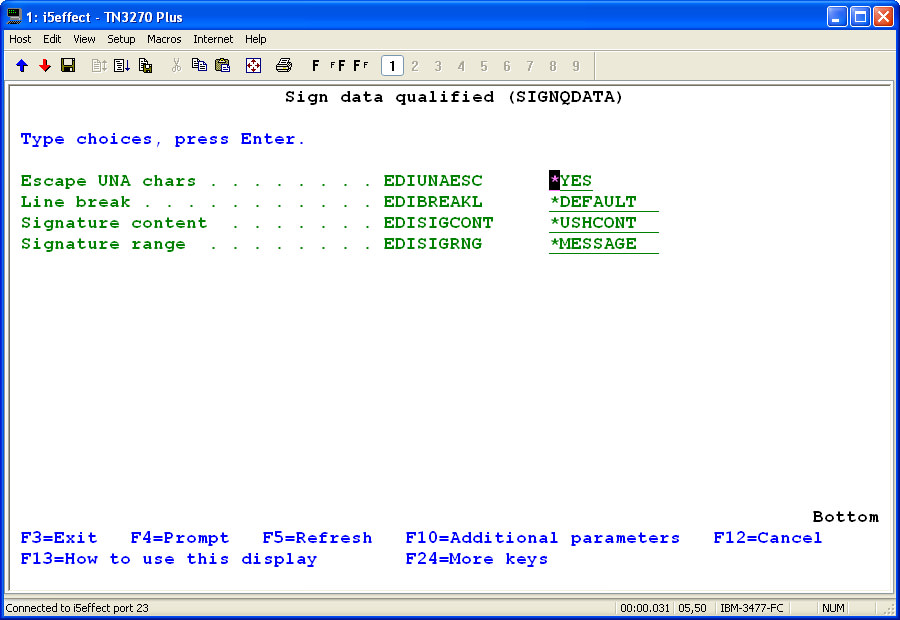
Configuration Page 2 of "signqdata" (Only visible for *EDIFACT signature types): |
||||
|
UNA Escape Charaters [EDIUNAESC] |
Determines if the UNA characters in the newly inserted signature segement of the EDIFACT file will be replaced with escape characters.
|
|
Line Breaks [EDIBREAKL] |
This parameter determines if a CRLF will be inserted at the end of a segment or not. Depending on the settings, the original file will be changed and line breaks will be inserted or removed.
Possible Values:
|
|
Signature Content [EDISIGCONT] |
This parameter determines which contents will make up the signature, when EDIFACT messages are signed.
Possible Values:
|
|
Signature Range [EDISIGRNG] |
This parameter sets the signature range within an EDIFACT interchange (files).
Possible Values:
|
|
EDIFACT Message Type [EDITYPE] |
Either all message types (*ALL) or one specific message type can be signed (e.g ORDERS, INVOICE).
Default Setting:
|
|
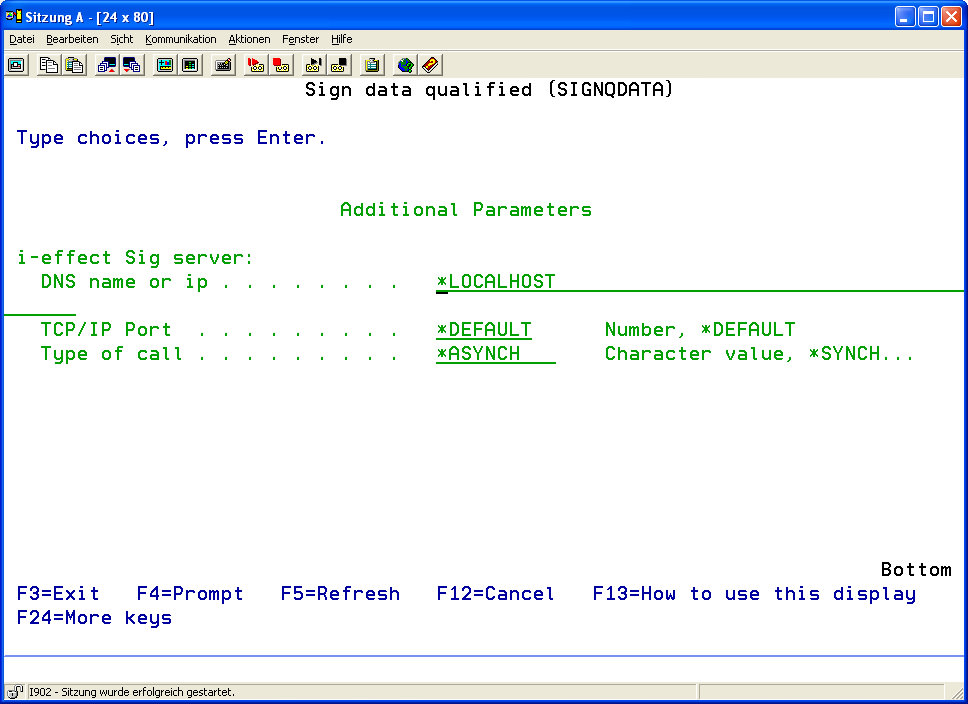
Final Configuration Page of "signqdata": |
|
i-effect *SIGG Server [EFFSERVER] |
||||||
|
DNS Name or IP |
Name or IP address of the system where the signature server is run.
Default: |
|
||||
|
Note:
|
||||||
|
TCP/IP Port |
TCP/IP port of the signature server.
Default: |
|
||||
|
Type of Query |
Determines how the server will deal with requests. |
|
||||