
You reach the menu for the signature of PDF data, as you select choice 12 in the i-effect menu and afterwards menu item 6 "process data with PGP".
Alternatively you can directly enter the command "STRGP" followed from F4 in the i-effect menu.
The following dialogue program is shown:
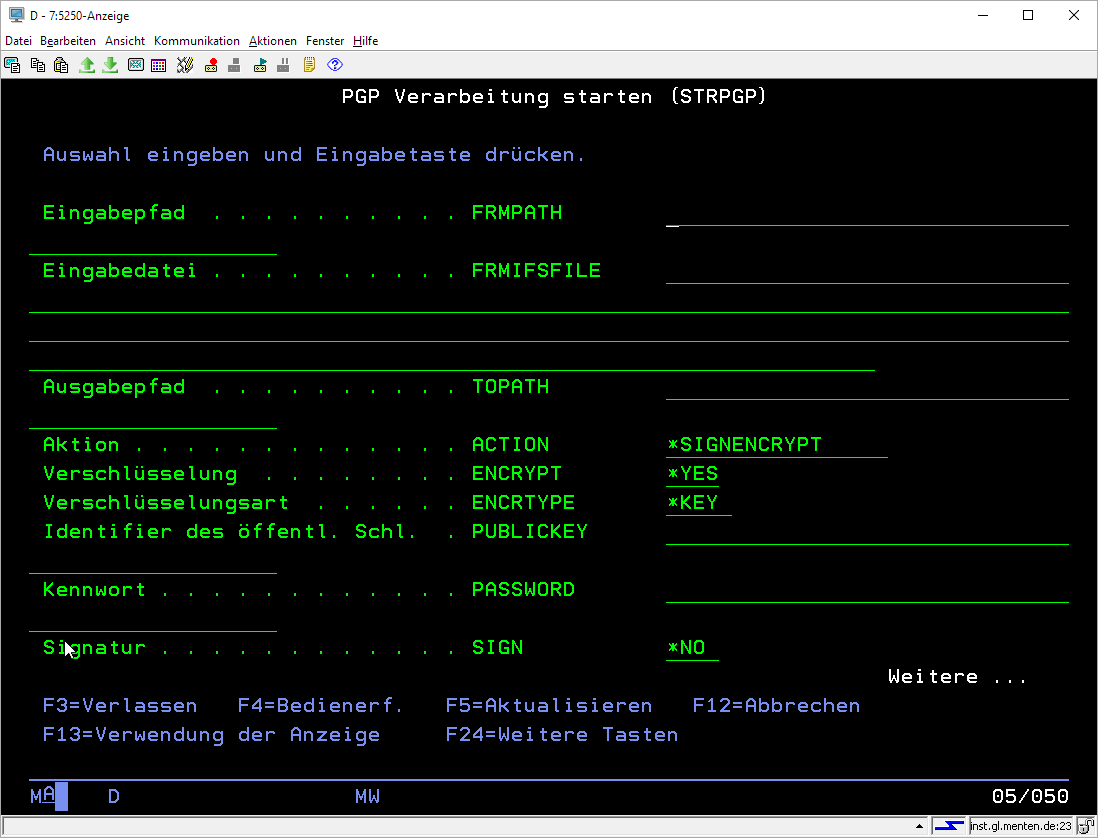
Explanation of the command parameters:
|
Entry paths (FRMPATH) |
Allegation of the path inside the IFS files system, out of which the data should be processed. |
||||||||||
|
Input file (FRMIFSFILE) |
Enter the IFS-input file for the signature/encryption. The usage of the wildcard symbols "*" and "?" inside the name is not supported. |
||||||||||
|
Output path (TOPATH) |
Name of the output path for the designated and/or encrypted data. The filename equates the original filename of the assigned file, supplemented with the PGP specific extension '.gpg' respectively 'asc.'. If there are already existing files under this name inside the target folder, you have to keep the files distinct with adherence of a number. |
||||||||||
|
Action (ACTION) |
Determines, if the designation/encoding or the identification/decryption should be started.
|
||||||||||
|
Possible parameters for action *SIGNENCRYPT |
Subsequent the possible parameters for the processing type *SIGNENCRYPT |
||||||||||
|
Encoding (ENCRTYPE) |
Enter here, if the file should be encoded. *YES/*NO |
||||||||||
|
Encryption type (ENCRTYPE) |
Defines the type of encoding. Either with a password (symmetric) or with a PGP public key (assymetric).
|
||||||||||
|
Identifier of the public key (PUBLICKEY) |
Only usable if ENCRTYPE = *KEY Name here the ID of the public key with which you want to encode. This can be the user ID of the key owner or the 8 digit, hexadecimal ID of the key. |
||||||||||
|
Password (PASSWORD) |
Only usable if ENCRTYPE = *PASS Enter here the password for the encryption. |
||||||||||
|
Signature (SIGN) |
Enter here if it should be signed. *YES/*NO |
||||||||||
|
Type of signature (SIGNTYPE) |
Define the signature type. This specifies, in which form the signature will be generated.
|
||||||||||
|
If you want to encode or sign only *EMBED is the only possible value.
|
|||||||||||
|
ID private key (PRIVATEKEY) |
Enter the ID of the private keys which you want to sign with. This can be the user ID of the key owner or the 8 digit, hexadecimal ID of the key. |
||||||||||
|
Password for the private key (PRIVATPASS) |
The password that gives access to the private key. |
||||||||||
|
Signature algorithm (SIGNALG) |
Shows which algorithm is used for generating the signature.
|
||||||||||
|
Compress (COMPRESS) |
Shows if the files should be compressed. *YES/*NO. |
||||||||||
|
ASCII cover (ASCIIARMD) |
Shows, if the PGP output file is encoded into a legible ASCII file. The PGP files will be packed into a text cover through BASE64 Algorithms. *YES/*NO. |
||||||||||
If you do not want to encode (ENCRYPT"="*NO") and with signature type *CLEAR signed (SIGN"="*YES","SIGNATURE_TYPE"="*CLEAR"), the parameters COMPRESS and ASCIIARMD are not allowable and cannot be demurred.
|
Possible parameters for action *DECRYPTVERIFY |
Subsequent the possible parameters for the processing type*DECRYPTVERIFY |
|
Identifier of the public key (PUBLICKEY) |
In case you encoded asymmetric, enter the ID of the public key with its associated private key that should be encoded. This can be the user ID of the key owner or the 8 digit, hexadecimal ID of the key. |
|
Decryption password (DECRPASS) |
Enter the password for encoding here. The password is dependent from the type of how the file was encoded.
|