
-
From the i-effect Compression menu enter menu item 8 "Simple GZIP Decompression". (STRGZIP COMPRESS(*DECOMP)) can also be entered directly.
-
Fill in the fields as required and press enter. i-effect will show the compression status at the bottom of the display.
Note:
The screen content will vary, depending on whether the archive is from the DB2 or IFS file system, and whether it is to be extracted into the DB2 or IFS files system.
Note:
For a desrciption of the parameters see menu item 7 "Simple GZIP Compression"
At the end of decompression, i-effect will give notice and a detailed account of the number of decompressions, errors and overread files.
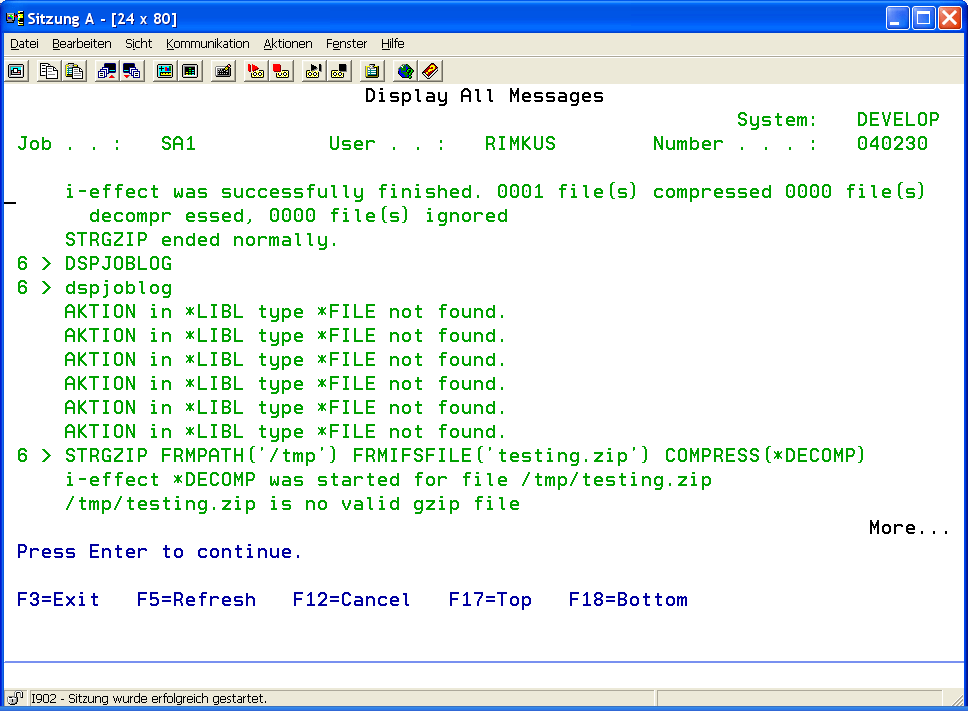
The last diagnostic message will contain information about the total number of files processed.
|
File System (FS) |
The file system of the ZIP archive which will be decompressed.
|
|||||||||||||||||||||||
|
Archive File (ARCFILE) |
Name of the existing archive file which will be converted into a self-extracting archive. This parameter consists of three elements:
|
|||||||||||||||||||||||
|
Archive File (ARCPATH) |
The complete path name of the archive file in the IFS file system, e.g. /tmp/archive.zip. |
|||||||||||||||||||||||
|
Output Files System (OUTFS) |
The file system for the self-extracting archive.
|
|||||||||||||||||||||||
|
Name of the Self-Extracting (SFX) File (SFXFILE) to be created. |
Name of the Self-Extracting (SFX) File (SFXFILE) to be created.
|
|||||||||||||||||||||||
|
Path of the SFX File to be created (SFXPATH) |
The complete path name of the self-extracting file to be created.
|
|||||||||||||||||||||||
|
Replace (REPLACE) |
An output file which will be created can replace an existing file with the same name.
|
|||||||||||||||||||||||
|
Operating System (OS) |
Determines the operating system for which the SFX will be created.
|
|||||||||||||||||||||||
|
SFX Options (SFXOPTION) |
The self-extracting archive can be configured by using the following options. Its charcateristics will be different at its run time. |
|||||||||||||||||||||||
|
GUI Interface |
||||||||||||||||||||||||
|
The parameter consists of 5 elements. |
The first parameter (GUI Interface) determines the appearance. Possible Special Values:
|
|||||||||||||||||||||||
|
Automatic Extraction The second parameter deterimes if the contents will be extracted automatically from the archive as soon as the self-extracted archive is run. Possible Special Values:
|
||||||||||||||||||||||||
|
Open Directory The third parameter offers the possibility to view the contents of the target folder after the extraction is complete.
|
||||||||||||||||||||||||
|
Run after extraction With the fourth parameter, a program can be run in the target system after the files have been extracted from the archive. For example, Batch procedures for setup programs can be run.
|
||||||||||||||||||||||||
|
Standard Directory The target directory is specified with the fifth parameter. If "Automatic Extraction" was selected, this is the specified path. An acceptable Windows path or name must be specified. It cannot contain any invalid path characters ( e.g. / : * ?"<> |) or the program will abort.
|
||||||||||||||||||||||||