
Menu item 86: Terminate the i-effect subsystems (ENDEFFSBS)
You can end all or individual subsystems of i-effect with the following dialog program.
Select menu item 86 in the i-effect®main menu to end sub systems.
The following display will appear:
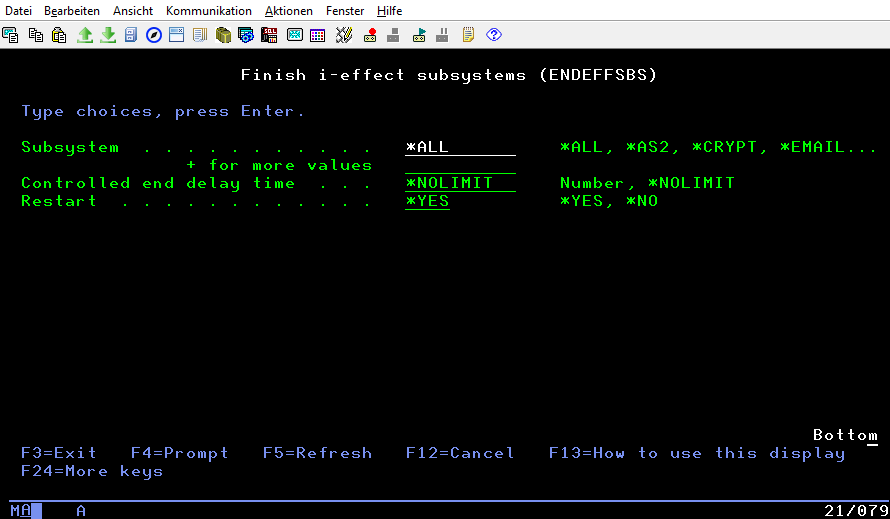
The following subsystem values - depending on the modules be licensed - are possible:
Subsystem | Description |
|---|---|
*ALL | All i-effect sub systems are ended. |
*AS2 | The i-effect AS2 subsystem is ended. |
*CRYPT | The i-effect CRYPT subsystem is ended. |
The i-effect EMAIL subsystem is ended. | |
*REPORT | The i-effect REPORT subsystem is ended. |
*SOA | The i-effect SOA subsystem is ended. |
*ZIP | The i-effect ZIP subsystem is ended. |
*SERVER | The i-effect SERVER subsystem is ended. |
*OFTP2 | The i-effect OFTP2 subsystem is ended. |
*HTTP | The i-effect HTTP subsystem is ended. |
*OCSP | The i-effect OCSP subsystem is ended. |
*EDI | The i-effect EDI subsystem is ended. |
*FTP | The i-effect FTP subsystem is ended. |
*UTIL | The i-effect UTIL subsystem is ended. |
*ZUGFERD | The i-effect ZUGFERD subsystem is ended. |
*SERVICE | The i-effect SERVICE subsystem is ended. |
*WEBCTRL | The i-effect WEBCONTROL subsystem is ended. |
What does the Controlled end delay time do?
Specifies the amount of time (in seconds) that is allowed to complete the controlled subsystem end operation. If this amount of time is exceeded and the end operation is not complete, any jobs still being processed in the subsystem are ended immediately.
The following value for Controlled end delay time are possible:
Controlled end delay time | Description |
|---|---|
*NOLIMIT | The amount of time in which to complete a controlled end is not limited. |
0-99999 | Specify the number of seconds in which the end operation is allowed to complete. |
The following value for Restart are possible:
Restart | Description |
|---|---|
*NO | The subsystem(s) will not be restarted. |
*YES | The subsystem(s) will be restarted immediately following a successful ending. |