
Menu item 85: Start the i-effect subsystems (STREFFSBS)
You can start all or individual subsystems of i-effect with the following dialog program. This will no longer be necessary after version V1R3M1, because the required sub systems will be started automatically.
Select menu item 85 in the i-effect main menu to start sub systems.
The following display will appear:
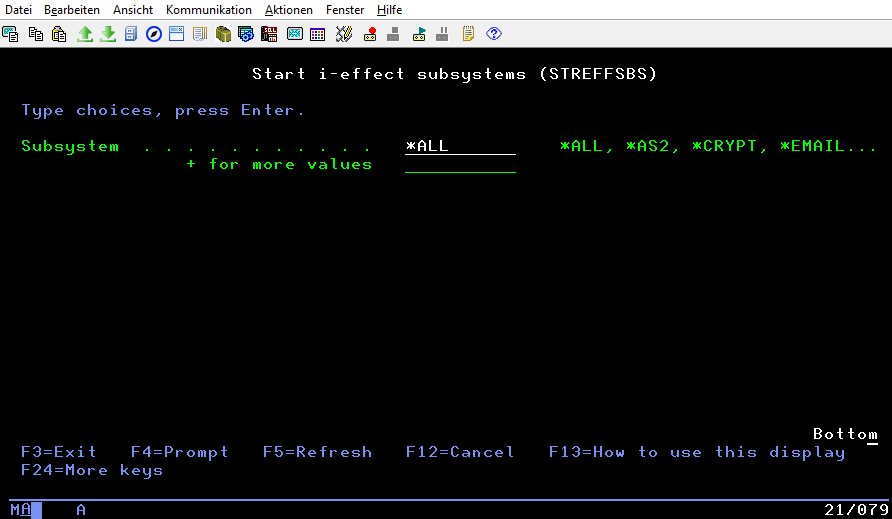
The following values - depending on the modules be licensed - are possible:
Subsystem | Description |
|---|---|
*ALL | All i-effect subsystems are started. |
*AS2 | The i-effect AS2 subsystem is started. |
*CRYPT | The i-effect CRYPT subsystem is started. |
The i-effect EMAIL subsystem is started. | |
*REPORT | The i-effect REPORT subsystem is started. |
*SOA | The i-effect SOA subsystem is started. |
*ZIP | The i-effect ZIP subsystem is started. |
*SERVER | The i-effect SERVER subsystem is started. |
*OFTP2 | The i-effect OFTP2 subsystem is started. |
*HTTP | The i-effect HTTP subsystem is started. |
*OCSP | The i-effect OCSP subsystem is started. |
*EDI | The i-effect EDI subsystem is started. |
*FTP | The i-effect FTP subsystem is started. |
*UTIL | The i-effect UTIL subsystem is started. |
*ZUGFERD | The i-effect ZUGFERD subsystem is started. |
*SERVICE | The i-effect SERVICE subsystem is started. |
*WEBCTRL | The i-effect WEBCONTROL subsystem is started. |